ebokify (@ebokify@mastodon.social)
🎉 Check out this project!
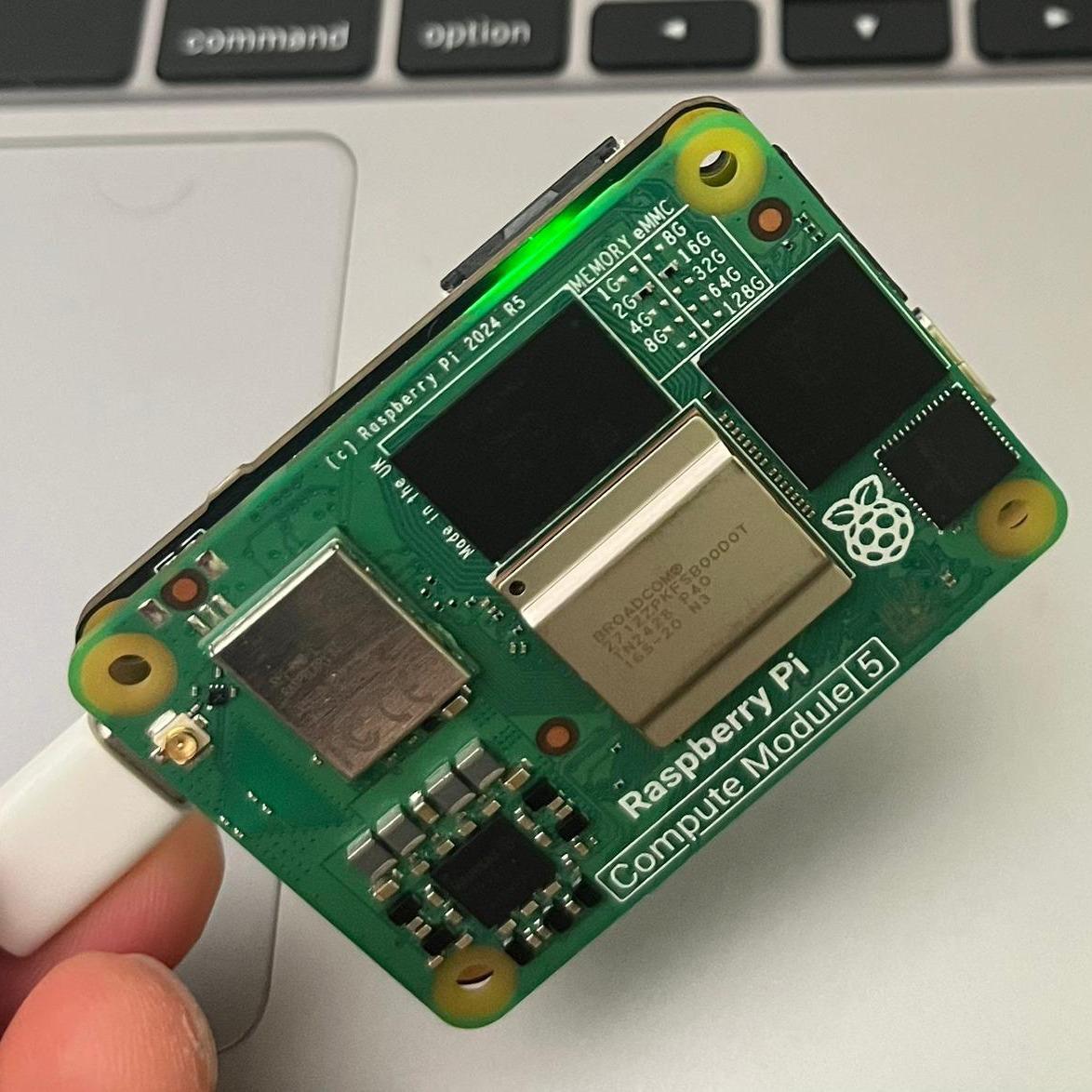
Their creation: Argo – a tiny CM5 carrier PCB for Raspberry Pi CM5. Compact, smart, and packed with possibilities!
💡 JLCPCB handled the 2-sided assembly, making it easier than ever to bring your PCB ideas to life.
✨ Feeling inspired? Start your own PCB project today!
🔥 Top 6 Raspberry Pi eBooks for $20
https://ebokify.com/top-6-Raspberry-pi-ebooks
Show Original Post
bls (@bls@mas.to)
@jgoerzen Not a serial device (BTW...Vcool...VT510!) but you can use SSH to unlock the encrypted rootfs.
https://github.com/gitbls/sdm/blob/master/Docs/Disk-Encryption.md
Show Original Post
davidegts (@davidegts@mastodon.social)
"[S]omeone deliberately traps an #LLM within [a #RaspberryPi] SBC that doesn't have enough memory to keep it running forever. Eventually, the memory will run out & the AI will reset. The worst part? The AI knows this. And it's not happy." https://www.xda-developers.com/llm-raspberry-pi-art-piece/
Show Original Post
gtronix (@gtronix@infosec.exchange)
Pironman 5 Max Review: Best Raspberry Pi Case Money can Buy
Give your Raspberry Pi 5 a stunning makeover with this tower case.
https://itsfoss.com/pironman-5-max-review/
Show Original Post
RPiSpy (@RPiSpy@mastodon.social)
Promoting young people’s agency in the age of AI https://www.raspberrypi.org/blog/promoting-young-peoples-agency-in-the-age-of-ai/ #RaspberryPi (via Raspberry Pi Foundation)
Show Original Post
jgoerzen (@jgoerzen@floss.social)
In an update to yesterday's post, I found I could get reasonably good full-disk encryption on a #RaspberryPi 4 with the xchacha12/Adiantum configuration.
BUT, there is no way to enter the passphrase at boot when trying to use a USB-to-serial device.
If you like, follow me down this path of encryption and weird Pi UARTs (one of which changes its baud rate when the VPU clock speed changes).
Show Original Post
archives (@archives@changelog.complete.org)
Performant Full-Disk Encryption on a Raspberry Pi, but Foiled by Twisty UARTs
In my post yesterday (“ARM is great, ARM is terrible (and so is RISC-V)), I described my desire to find ARM hardware with AES instructions to support full-disk encryption, and the poor state of the OS ecosystem around the newer ARM boards.
I was anticipating buying either a newer ARM SBC or an x86 mini PC of some sort.
More-efficient AES alternatives
Always one to think, “what if I didn’t have to actually buy something”, I decided to research whether it was possible to use encryption algorithms that are more performant on the Raspberry Pi 4 I already have.
The answer was yes. From cryptsetup benchmark:
root@mccoy:~# cryptsetup benchmark --cipher=xchacha12,aes-adiantum-plain64 # Tests are approximate using memory only (no storage IO).# Algorithm | Key | Encryption | Decryptionxchacha12,aes-adiantum 256b 159.7 MiB/s 160.0 MiB/sxchacha20,aes-adiantum 256b 116.7 MiB/s 169.1 MiB/s aes-xts 256b 52.5 MiB/s 52.6 MiB/s
With best-case reads from my SD card at 45MB/s (with dd if=/dev/mmcblk0 of=/dev/null bs=1048576 status=progress), either of the ChaCha-based algorithms will be fast enough. “Great,” I thought. “Now I can just solve this problem without spending a dollar.”
But not so fast.
Serial terminals vs. serial consoles
My primary use case for this device is to drive my actual old DEC vt510 terminal. I have long been able to do that by running a getty for my FTDI-based USB-to-serial converter on /dev/ttyUSB0. This gets me a login prompt, and I can do whatever I need from there.
This does not get me a serial console, however. The serial console would show kernel messages and could be used to interact with the pre-multiuser stages of the system — that is, everything before the loging prompt. You can use it to access an emergency shell for repair, etc.
Although I have long booted that kernel with console=tty0 console=ttyUSB0,57600, the serial console has never worked but I’d never bothered investigating because the text terminal was sufficient.
You might be seeing where this is going: to have root on an encrypted LUKS volume, you have to enter the decryption password in the pre-multiuser environment (which happens to be on the initramfs).
So I started looking. First, I extracted the initrd with cpio and noticed that the ftdi_sio and usbserial modules weren’t present. Added them to /etc/initramfs-tools/modules and rebooted; no better.
So I found the kernel’s serial console guide, which explicitly notes “To use a serial port as console you need to compile the support into your kernel”. Well, I have no desire to custom-build a kernel on a Raspberry Pi with MicroSD storage every time a new kernel comes out.
I thought — well I don’t stricly need the kernel to know about the console on /dev/ttyUSB0 for this; I just need the password prompt — which comes from userspace — to know about it.
So I looked at the initramfs code, and wouldn’t you know it, it uses /dev/console. Looking at /proc/consoles on that system, indeed it doesn’t show ttyUSB0. So even though it is possible to load the USB serial driver in the initramfs, there is no way to make the initramfs use it, because it only uses whatever the kernel recognizes as a console, and the kernel won’t recognize this. So there is no way to use a USB-to-serial adapter to enter a password for an encrypted root filesystem.
Drat.
The on-board UARTs?
I can hear you know: “The Pi already has on-board serial support! Why not use that?”
Ah yes, the reason I don’t want to use that is because it is difficult to use that, particularly if you want to have RTS/CTS hardware flow control (or DTR/DSR on these old terminals, but that’s another story, and I built a custom cable to map it to RTS/CTS anyhow).
Since you asked, I’ll take you down this unpleasant path.
The GPIO typically has only 2 pins for serial communication: 8 and 10, for TX and RX, respectively.
But dive in and you get into a confusing maze of UARTs. The “mini UART”, the one we are mostly familiar with on the Pi, does not support hardware flow control. The PL011 does. So the natural question is: how do we switch to the PL011, and what pins does it use? Great questions, and the answer is undocumented, at least for the Pi 4.
According to that page, for the Pi 4, the primary UART is UART1, UART1 is the mini UART, “the secondary UART is not normally present on the GPIO connector” and might be used by Bluetooth anyway, and there is no documented pin for RTS/CTS anyhow. (Let alone some of the other lines modems use) There are supposed to be /dev/ttyAMA* devices, but I don’t have those. There’s an enable_uart kernel parameter, which does things like stop the mini UART from changing baud rates every time the VPU changes clock frequency (I am not making this up!), but doesn’t seem to control the PL011 UART selection. This page has a program to do it, and map some GPIO pins to RTS/CTS, in theory.
Even if you get all that working, you still have the problem that the Pi UARTs (all of them of every type) is 3.3V and RS-232 is 5V, so unless you get a converter, you will fry your Pi the moment you connect it to something useful. So, you’re probably looking at some soldering and such just to build a cable that will work with an iffy stack.
So, I could probably make it work given enough time, but I don’t have that time to spare working with weird Pi serial problems, so I have always used USB converters when I need serial from a Pi.
Conclusion
I bought a fanless x86 micro PC with a N100 chip and all the ports I might want: a couple of DB-9 serial ports, some Ethernet ports, HDMI and VGA ports, and built-in wifi. Done.
Show Original Post
miked (@miked@mastodon.gamedev.place)
Today I cooked myself a rib eye and some eggs and after I finish eating am gonna learn some arch linux on this Raspberry Pi that I got as a gift from a friend :)
Chest day later in the gym 💪😌
#linux #steak #gym #raspberrypi #archlinux

Show Original Post
Elecrow (@Elecrow@mastodon.social)
📢 Unboxing & Assembling the #Elecrow Mini PC Case for #RaspberryPi 5 & Jetson Orin Nano 👋🏻
https://youtu.be/JFi1-EMLJY8?feature=shared
Show Original Post
ben (@ben@bluetoot.hardill.me.uk)
Having rack mounted 5 of my Raspberry Pis recently I now have a bunch of "spare" Pimoroni Pibow cases
Must resist the urge to just by more Pi

Show Original Post
wezm (@wezm@mastodon.decentralised.social)
"The HackberryPi_CM5 project is a RaspberryPi Compute Module SBC(single board computer) powered handheld computer with reuse of original keyboard from old Blackberry phones. The goal of the project is to create a portable linux-powered computer that lets the user gain a deeper understanding of Linux and explore the architecture of hardware, software, and the Linux kernel."
https://github.com/ZitaoTech/HackberryPiCM5 #Linux #RaspberryPi

Show Original Post
toroidalcore (@toroidalcore@masto.hackers.town)
The Raspberry Pi Zero 2 W I set up to automatically water some pumpkin vines growing in buckets has a 50-day uptime right now. All that time it's been running on the same 12 amp hour gel cell battery and 25 W solar panel. I've played with when and how long the pump the setup also powers runs, but for the most part it's gone steady.
I don't have any actual measurements, but it's still an interesting data point.
Show Original Post