piotrekjeremicz (@piotrekjeremicz@mastodon.social)
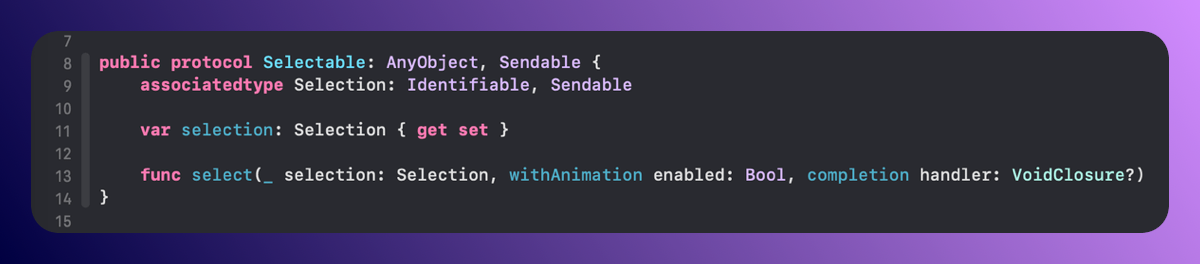
#Selectable is quite similar to the previous case but is designed to select one of many screens, as seen in scenarios like TabBar. 📲
Differentiating between these two types helps clarify the intended purpose of a given Navigator. 🧭
#iOS #Navigation #Mobile #DevDiary #SwiftUI
Show Original Post
piotrekjeremicz (@piotrekjeremicz@mastodon.social)
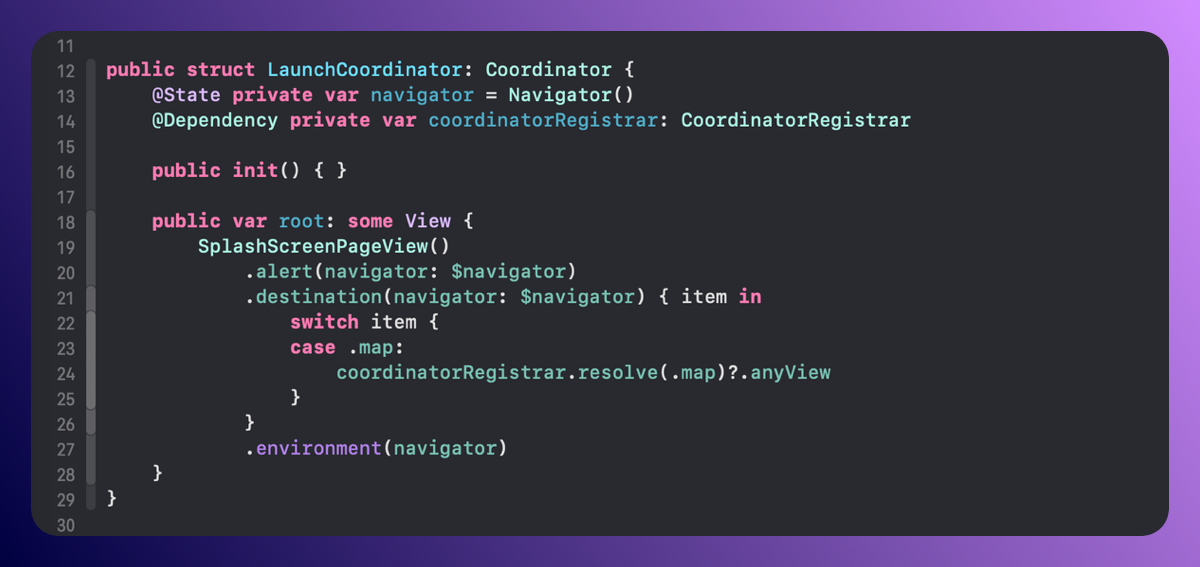
The coordinator serves as the foundation for my navigation. It always includes a navigator, which can be one of four types. 🧭
Coordinators are registered in modules, allowing them to be resolved from any other independent module later. 📦
#BuildInPublic #SwiftUI #DevDiary #iOS
Show Original Post
thenerd_be (@thenerd_be@mastodon.social)
Just created a little Swift Package TNCrossPromo that lets you easily do cross-promotion of your other apps inside a specific app.
For now, I always manually added these inside my apps, but updating every app became a burden ... so now I just need to update a json and all the apps get the new version.
It's available on Github ⤵️
https://github.com/frederik-jacques/TNCrossPromo
#swiftui #indiedev #buildinpublic
Show Original Post
dimitribouniol (@dimitribouniol@mastodon.social)
Picked some colors today! As usual, let's sleep on it and make some minor tweaks in a day or two. Tomorrow night, I'll be streaming from a different setup temporarily, so we'll see how well it works haha. See you then!
🔜 Tomorrow’s stream: https://youtube.com/live/exbGvk6Ymro
⏮️ Playlist so far: https://www.youtube.com/playlist?list=PLRxjf93xotuofCtaxtGOcWeuxVZYJyY-m
📲 Download Jiiiii: https://apps.apple.com/app/apple-store/id6472801548?pt=14724&ct=MastodonCCStreams&mt=8
#Jiiiii #DevStream #tvOS #visionOS #macOS #iOS #iPadOS #Anime #Swift #SwiftUI #Vapor #WebAuthn #BuildInPublic #TestFlight #PWA #WebPush

Show Original Post
dimitribouniol (@dimitribouniol@mastodon.social)
I'm making a seasonal anime guide app, in the open for all to experience and learn from.
Take two trying to stream… will it work now after restarting all the things???
#Jiiiii #DevStream #tvOS #visionOS #macOS #iOS #iPadOS #Anime #SwiftLang #SwiftUI #Vapor #WebAuthn #BuildInPublic #TestFlight #PWA #WebPush
Come chill with me: https://youtube.com/live/8xCj21h1ARY
Show Original Post

goodbinary (@goodbinary@mastodonapp.uk)
I did a lot of work today, some quite frustrating, getting widgets all working across Mac, iPhone and iPad. Still some tweaks needed, but the new app is almost done, functionality wise 🤔
#indiedev #buildinpublic #swift #swiftui #mac #iosdev

Show Original Post
helge (@helge@mastodon.social)
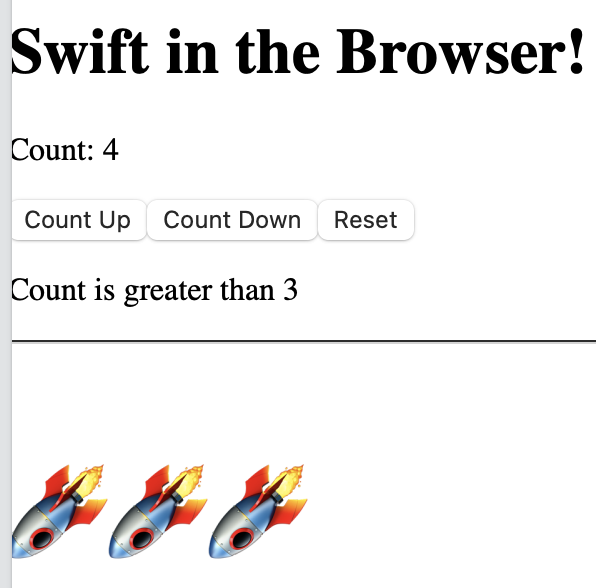
This is actually pretty cool: https://github.com/elementary-swift/starter-vite
#SwiftUI #Wasm
Show Original Post
2025 (@2025@jakespurlock.com)
Celluloid: A Virtual Camera App for macOS
I’ve had a Logitech C920 webcam for years. It’s a solid camera, but I’ve always hated its color grading — it pushes everything red, making me look perpetually sunburned on video calls.
Zoom has a “Touch up my appearance” filter that helped a bit, but most of my calls happen in Google Meet, which doesn’t have anything comparable. I wanted a solution that worked across all my video apps — set it once and forget it.
So I built one.
Introducing Celluloid – Camera Filters
Celluloid is a macOS menu bar app that creates a virtual camera with real-time filters and color adjustments. Select “Celluloid Camera” in any video app — Zoom, Google Meet, FaceTime, Microsoft Teams, OBS — and your enhanced video just works.
Features include:
- Film-inspired filters — Black Mist (dreamy diffusion), Halation (vintage highlight bloom), Gate Weave (film projector movement), plus classics like Noir and Chrome
- Color controls — Brightness, contrast, saturation, exposure, color temperature, and sharpness
- Built-in LUTs — Professional color grades ready to use, including one specifically tuned to fix the Logitech C920’s color issues
- Battery friendly — The camera only activates when an app is actually using it
- Privacy focused — All processing happens locally on your Mac. No data collected or transmitted.
How It Works
Celluloid uses Apple’s CMIOExtension framework to register a virtual camera device with macOS. The main app captures video from your physical webcam, applies filters using Core Image and custom Metal shaders, then sends the processed frames to the camera extension via CoreMediaIO sink streams.
The technical journey was interesting — I tried several IPC approaches (file-based sharing, CFPreferences, shared memory) before landing on sink streams, which turned out to be the correct approach for CMIOExtensions running in their restricted sandbox.
Some technical highlights:
- SwiftUI for the interface
- AVFoundation for camera capture
- Metal-backed CIContext for GPU-accelerated filter processing
- Custom Metal shaders for the Black Mist diffusion effect
- CVPixelBufferPool for efficient buffer reuse
- Darwin notifications for IPC between the app and extension
Get It
Celluloid – Camera Filters is available now on the Mac App Store.
The code is open source on GitHub.
If you’ve ever wished you could look a little better on video calls without buying studio lighting, give it a try. And if you have ideas for new filters or LUTs, I’d love to hear them.
#app #development #MacOS #NerdyStuff #Swift #SwiftUI
Show Original Post
dimitribouniol (@dimitribouniol@mastodon.social)
20 min of mouse lag later, I realized YouTube isn't even getting enough frames to show anything, so I think I'm gonna give my computer a break from its panic attack 😅 Tomorrow night, let's try again? See you then!
🔜 Tomorrow’s stream: https://youtube.com/live/8xCj21h1ARY
⏮️ Playlist so far: https://www.youtube.com/playlist?list=PLRxjf93xotuofCtaxtGOcWeuxVZYJyY-m
📲 Download Jiiiii: https://apps.apple.com/app/apple-store/id6472801548?pt=14724&ct=MastodonCCStreams&mt=8
#Jiiiii #DevStream #tvOS #visionOS #macOS #iOS #iPadOS #Anime #Swift #SwiftUI #Vapor #WebAuthn #BuildInPublic #TestFlight #PWA #WebPush
Show Original Post
dimitribouniol (@dimitribouniol@mastodon.social)
I'm making a seasonal anime guide app, in the open for all to experience and learn from.
Time for everyone's favorite stream: picking colors for next season 😛 Let's start making the winter season icon!
#Jiiiii #DevStream #tvOS #visionOS #macOS #iOS #iPadOS #Anime #SwiftLang #SwiftUI #Vapor #WebAuthn #BuildInPublic #TestFlight #PWA #WebPush
Come chill with me: https://youtube.com/live/Z1ncZ-bZbqo
Show Original Post
myell0w (@myell0w@mindly.social)
Has anyone noticed the tap target of standard #swiftUI Button(role: .close) being super small on iOS 26?
Am I missing something? The glass effect will trigger, but nothing happens when you don’t tap it directly centered.
Show Original Post