kevsmac (@kevsmac@mastodon.social)
Got a new Raspberry Pi for Christmas - want to know what to do with it? I've got you covered:
https://kevsrobots.com/ideas/raspberrypi.html
Show Original Post
WenhamToo (@WenhamToo@mstdn.social)
Another experiment I did with #AI assistants used the #Warp terminal with Claude.
I set up a #RaspberryPi Zero with a camera and asked Warp to make it stream video from the camera with RTSP.
It installed tons of utilities and libraries, wrote Python, wrote command line invocations, each time failing. I asked it to try doing it several different ways. Each time it would fail. It'd read the error logs, install more stuff, and fail again.
Then I exhausted my AI credits 
Show Original Post
CalcProgrammer1 (@CalcProgrammer1@mastodon.social)
My dad and I built a claw machine for my girlfriend for Christmas! She loves claw machines so we decided it would be a fun gift and a fun build. Powered by an #Arduino Nano and a #RaspberryPi 3, 3 EasyDriver stepper controllers, a continuous rotation SG90 servo in the claw, and a ton of 3D printed parts. I wrote the software using SDL2 in C++ though it still needs work.
Show Original Post
the_wub (@the_wub@mastodon.social)
@Larhanya @Alice We have a Linux NUC and a RPi 4 each attached to their own big dumb TVs used for consuming videos.
We use them for both DVDs and streaming from free and legal sources (libraries are great!).
We can view programs from the NRK for free, streamed via their web based content delivery system. But we generally don't watch anything beyond the news satire program "Nytt på nytt".
Having Junior Family Members means that most reading is for practical purposes.
Show Original Post
beitmenotyou (@beitmenotyou@retro.pizza)
Had a genuinely uplifting moment today. A friend’s 10 year old lit up when I mentioned Raspberry Pi. She explained Linux, hosting, and coding because they learn it at school.
We spent an hour talking self hosting and projects. She now wants a Pi for her birthday so we can learn together. Moments like this give me real hope for the future.
#Linux #RaspberryPi #SelfHosting #DigitalSkills #Hope
Show Original Post
nantel (@nantel@cosocial.ca)
Since streaming providers insist on shoving ads in my face no matter how much I’m willing to pay, I amended my Christmas list and my daughter has provided. 🏴☠️
#RaspberryPi #enshittification

Show Original Post
katzenjens (@katzenjens@social.tchncs.de)
Jo, läuft nun. Aber was mache ich jetzt damit? Keine Ahnung.
Hintergrund. Ich bastel momentan mit Alpine Linux auf dem Raspberry Pi herum. Dinge, welche mit Rasbpian mit Leichtigkeit zu erreichen sind, erweisen sich auf Alpine als mittelschwerer Akt. Was nun läuft:
- fertig konfiguriertes Alpine Linux, welches aber brav bei jedem Boot die WLAN Zugangsdaten aus dem Rootverzeichnis zieht.
- gleiches, aber mit #virtualhere , somit ein kabelloser USB-Anschluß.
- USB-Terminal-Konsole
Nutzlast der jeweiligen Images um die 75 MB. Laufen alle im RAM. Speicherkarte wird also geschont und kann sogar im laufenden Betrieb abgezogen werden.
Ich hätte auch Socken stricken können. Wäre mir schwerer gefallen. #basteln #raspberrypi #alpine

Show Original Post
wisze (@wisze@mastodon.social)
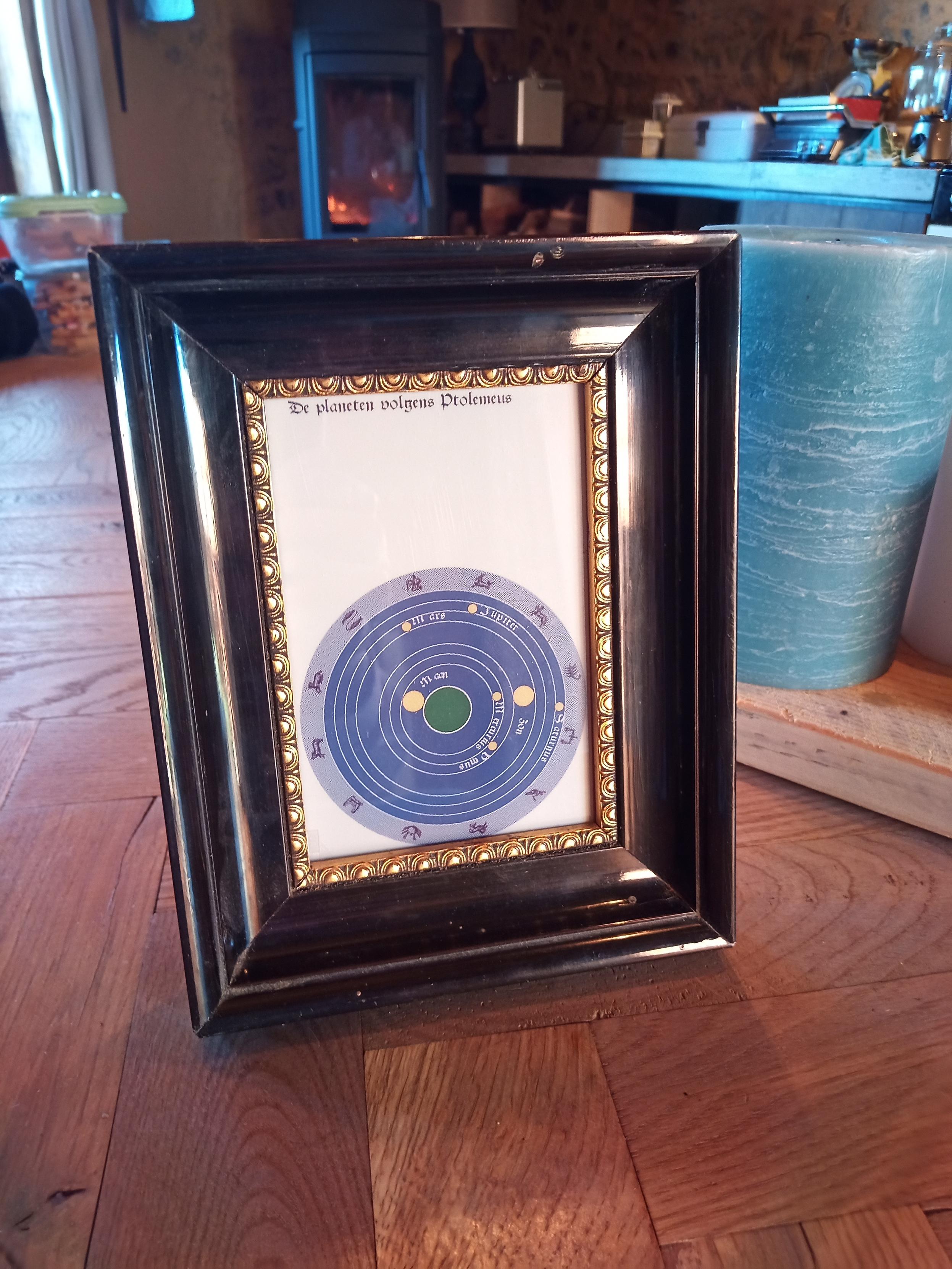
We hebben een lijstje gemaakt voor mijn middeleeuwse planeten planisfeer. Een #pimoroni kleuren e-ink scherm toont de posities van de planeten berekend volgens het systeem van Ptolemaeus. Het rekenwerk wordt gedaan door een #raspberrypi. Berekening klopt nog niet helemaal. Het lijstje maakt er echt een schilderijtje van. Code: https://github.com/wisze/eise/blob/master/ptolemeus.md
Show Original Post
dirksche (@dirksche@social.tchncs.de)
Hat hier Jemand #ollama auf einem Raspberry pi laufen? Hab da nämlich mal ne Frage:
Man kann ja über die Konsole per Curl mit dem gewünschten Modell kommunizieren. Gibt es dafür ein Frontend oder muss ich mir selber was basteln um prompts unkompliziert einzugeben und Antworten auszulesen?
#raspberrypi #ai #LLMs #selfhosting
Show Original Post
r (@r@fed.brid.gy)
ddrescue + Raspberry Pi Imager - Le combo pour cloner vos cartes SD sans vous arracher les cheveux
https://fed.brid.gy/r/https://korben.info/ddrescue-raspberry-pi-imager-clonage-carte-sd.html

Show Original Post
Ollital (@Ollital@nrw.social)
Alles neu im #raspberrypi Imager 2.0.0
https://raspithek.de/python/raspberry-pi-imager-version-2-0-0/
Show Original Post
r (@r@fed.brid.gy)
ラズパイとE-inkで「ちらっと見える」ホームダッシュボード——IKEAのフレームに収めて壁掛けに

Show Original Post