ghalfacree (@ghalfacree@mastodon.social)
It's Friday, so it's the last #Hackster round-up of the week - starting with a maker who missed a parrot friend when he appeared to stop visiting, so set up a #RaspberryPi powered bird monitoring system to see if he came back.
(Yes, I *know* I said "no more AI," but this is machine learning and computer vision - totally different!)
#Technology #News #Hackster #Makers
Show Original Post
PierreLecourt (@PierreLecourt@oisaur.com)
Raspberry Pi AI HAT+ 2 : l’étrange IA de monsieur Upton
La nouvelle extension Raspberry Pi AI HAT+ 2 promet plus de performances grâce à un NPU Hailo-10H et 8 Go de mémoire vive..
https://www.minimachines.net/?p=138862 #ia #raspberrypi

Show Original Post
maehw (@maehw@chaos.social)
Yesterday I learned:
28th Oct 2025 /
"I am delighted to announce that the #RaspberryPi Foundation is the new home for #Blockly, the world’s leading open source library for visual programming. (...) Blockly started life in 2011 in #Google as a passion project of one engineer. Since then — thanks to the generous support of Google, a small team of brilliant engineers, and an amazing community of open source contributors and partners (...)."
https://www.raspberrypi.org/blog/new-home-for-blockly/
Show Original Post
VTDARKSIM (@VTDARKSIM@toot.community)
Woot! My #RaspberryPi arrives today! 🎉
I’m excited to get a stable #HomeAssistant setup running on the new #RPi5 but also setting up #RetroPie on the old #RPi3 👾🎮

Show Original Post
docyeet (@docyeet@mastodon.halis.io)
I was having countless errors recently with Longhorn, keeping volumes in degraded and missing replicas, new replicas would stay on "Stopped" and never start the replication process
Today I tried bumping the simultaneous rebuild per node from 1 to 3, and everything seems to get back up progressively
I think I was stuck in a deadloop, and this over conservative setting was the trigger towards greatness
I had initially configured it to only rebuild one replica at a time, because otherwise my raspberry pis would crash with a big IOwait thread pinned to 100%
But now it's bigger x86 machines, so this setting doesn't make sense anymore
#raspberrypi #longhorn #k3s #volume #homelab #selfhosted #selfhosting #arm #x86

Show Original Post
hanscees (@hanscees@ieji.de)
@jurjen_heeck @Martranslations ik gebruik #RaspberryPi gewoon
Show Original Post
r (@r@fed.brid.gy)
Raspberry Pi Imager 2.0.4 Improves Handling for Files Larger Than 4GB

Show Original Post
benc (@benc@mastodon.hawaga.org.uk)
I have some #Pimoroni #BreakoutGarden sockets that I'm wiring onto a #Tildagon #Hexpansion because I have a few breakouts I'd like to use.
#I2C pins are obvious, but the connector has an ambiguous additional pin that is different on every board.
I guess I'll wire each one to a separate Tildagon GPIO. Which kinda de-generalises having everything on one i2c bus. (some boards its an interrupt out, some its a trigger in, on many its unused)
What do their official #RaspberryPi boards do here?
Show Original Post
WinFuture (@WinFuture@mastodon.social)
Der neue AI HAT+ 2 für den #RaspberryPi 5 bietet 8 GB RAM und einen Hailo-10H-Chip für lokale KI-Anwendungen. Die 130-Dollar-Erweiterung soll KI-Modelle wie Llama 3.2 unterstützen und Hauptprozessor entlasten. https://winfuture.de/news,156219.html?utm_source=Mastodon&utm_medium=ManualStatus&utm_campaign=SocialMedia
Show Original Post
n_dimension (@n_dimension@infosec.exchange)
Whoa... what do you mean you dont need a data centre to run #AI
Now I am going to look like a total idiot for assuming #AI will forever be stuck in the digital equivalent of a bronze age and never advance! Please no!
Raspberry pie AI Hat + 2.
U$ 130
#LLAMA #Qwen #DeepSeek 8GB Ram

Show Original Post
Cookies (@Cookies@mstdn.social)
I've *finally* taken the plunge and started kitting out some of my #RaspberryPi boards with proper storage : my five Pi 5s now each have 250GB NVMe. Three of my Pi 4s now have m.2 SATAs - one at 500GB and two at 250GB. I'll be completing a fourth 500GB Pi 4 as soon as the drive arrives.
I've wanted to upgrade some of my 68 Pies to better storage. The difference is like night and day. All my other Pies are going to feel syrupy from now on, due to the clear limitations of SD cards.
Fun times.

Show Original Post
bokunimo (@bokunimo@mastodon.social)
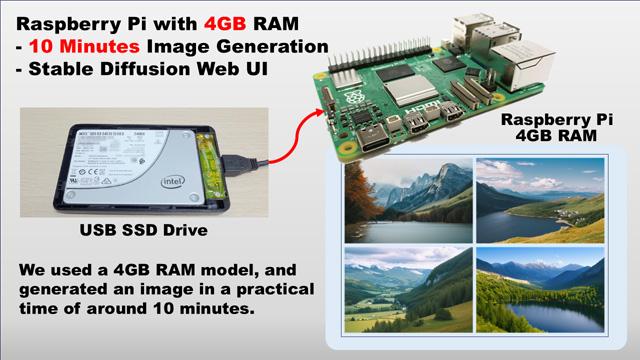
I wrote an article how to generate an AI image in a practical time of 10 minutes, using a Raspberry Pi 4GB RAM model.
Because of the insufficient memory only 4GB slows down the generation time to about 6 hours, and sometimes it makes OOM errors.
So I introduce a solution to swap to an SSD.
Please visit following URL to see the detail of this contents.
Google Translated:
https://bokunimo-net.translate.goog/blog/raspberry-pi/6228/?_x_tr_sl=ja&_x_tr_tl=en
Original Site written in Japanese:
https://bokunimo.net/blog/raspberry-pi/6228/
#stablediffusion #raspberrypi #4gb
Show Original Post