cocoafrog (@cocoafrog@hachyderm.io)
I think I just figured out why I (and I think several other #iOS developers who have used #UIKit before) have developed somewhat of an animosity against #SwiftUI:
SwiftUI makes simple things really simple. It also makes some very specific complex things simple.
But despite the theoretically really high customizability (it’s all custom views with lots of modifiers overall), that‘s at first glance much higher than UIKit, getting things *just right* and creating a solution that feels just *excellent* is really hard. And by now I’m convinced that creating excellent solutions that really fit in well with the OS and offer a great, frictionless UX to people using your app is *harder* in SwiftUI.
However, creating a solution that works and is good enough is *easier* in SwiftUI. With it you fairly quickly arrive at a solution where it’s hard to argue that the small pieces of friction, the slight irregularities in the UI, the bits where people can accidentally „hold it wrong“, that these things should be removed.
I believe these bits of friction occur more often in SwiftUI and are harder to remove than in UIKit.
Add to that the higher initial cost of getting a working solution in UIKit at all and this *strongly* tips the balance in favor of „good enough“ UX when using SwiftUI, and away from excellent UX.
And I hate that about SwiftUI.
Show Original Post
chrisgrande (@chrisgrande@twit.social)
The #iOS26 Phone.app feels like a rough draft in #SwiftUI that is now worked on for around an hour every two weeks. The only possible feedback that could be opened is “just use it you’ll see the problems”.
Show Original Post
nemesisprime (@nemesisprime@iosdev.space)
Me, hoping with every fiber of my being that I can keep using this SwiftUI built layout for this freeform board feature as I move into merging it with the data model. #iosdev #swiftUI
Show Original Post
technicat (@technicat@universeodon.com)
#swiftui scrolling charts
https://swiftylion.com/articles/scrollable-swiftui-charts
Show Original Post
patrickmcconnell (@patrickmcconnell@mastodon.social)
Insepector issue resolved for App Review.
If you have a scrolling view in an inspector (probably other container views as well) and the navigation/toolbar is on top the scrolling content may be draw over top of the nav/toolbar.
To resolve add .clipped() to the scrolling container. In my case it was a form so this is the fix:
Form {
…
}
.clipped()
no more overlap.
Show Original Post
kharrison (@kharrison@twit.social)
When Observable replaced ObservableObject in iOS 17 it was missing a way to stream changes. That was fixed in iOS 26 (swift 6.2). #iosdev #swiftui https://useyourloaf.com/blog/swift-observations-asyncsequence-for-state-changes/
Show Original Post
patrickmcconnell (@patrickmcconnell@mastodon.social)
My other App Review rejection looks like a #SwiftUI bug but I have to figure out which #MacOS version fixes it. Works on my machine.
If I'm correct I'll have to bump up the version requirement.
FYI: content in an inspector view will overlap an inspector view toolbar. I've seen it but my current 15.5 machine does not reproduce the problem App Review sees.
Life on the bleeding edge.
Show Original Post
vrhermit (@vrhermit@mastodon.social)
A few details on supporting rendering mode in visionOS widgets
https://stepinto.vision/example-code/widgets-adapting-content-to-rendering-modes/
Show Original Post
CityOfTheMoon (@CityOfTheMoon@mastodon.social)
Running #ipados 26 beta, and I keep thinking if Apple took each apps accent color and used it to subtly tint the glass, it would help separate the glass controls from the content behind them?
Show Original Post
nicoreese (@nicoreese@mastodon.social)
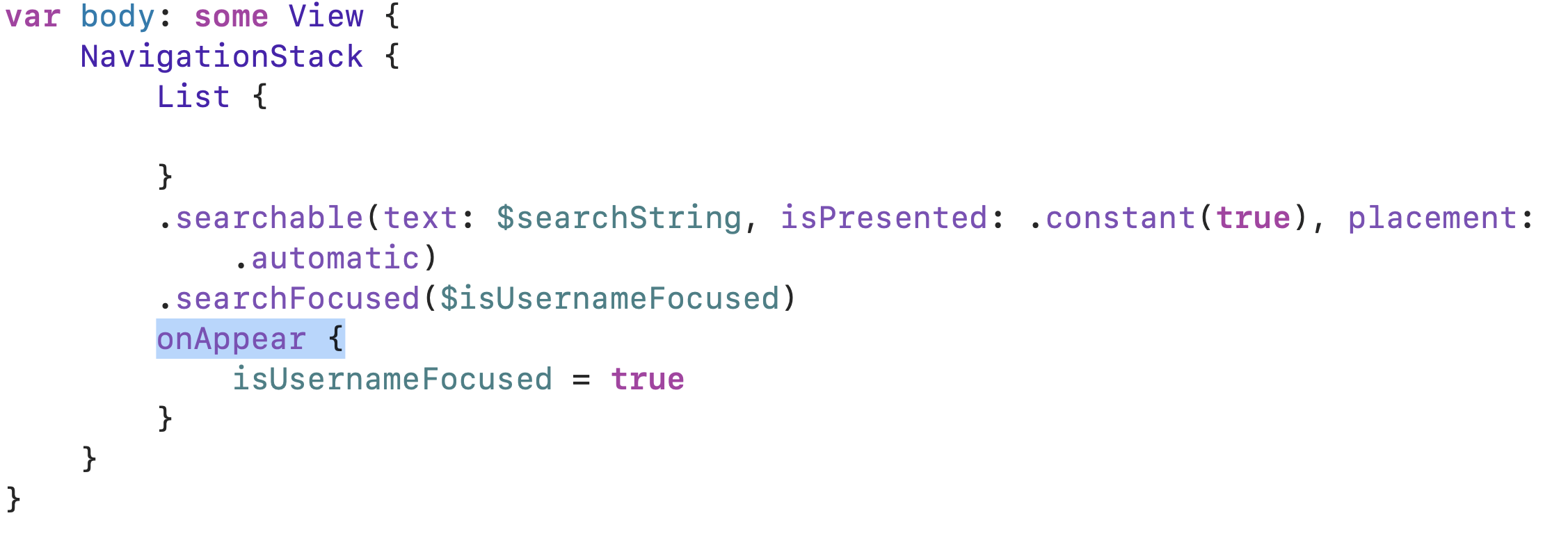
Why in the world does this compile and run? It crashes when presenting the view. #SwiftUI
Show Original Post
patrickmcconnell (@patrickmcconnell@mastodon.social)
Submitted Cartographer to App Review. Very curious what they will flag.
Thanks to everyone who participated in the TestFlight process. Not everyone provided feedback but just launching the app and not having crashes reported helps.
Not looking forward to the anti-subscription trolls and the “why doesn't it do X?” reviews but I think this is a good #MacOS app. I have a long roadmap of things to add and this is a solid v1.0
Show Original Post
cocoafrog (@cocoafrog@hachyderm.io)
In my all, I have a List view inside a NavigationStack (with a navigation bar wir Cancel button) inside a sheet in #SwiftUI.
The interactive dismiss (pull down to dismiss the sheet) constantly conflicts with the scroll gesture (move drag an item in the list downwards).
I can’t tell what movement pattern my fingers need to perform to trigger either of the behaviors it seems based on luck?
That can’t be right.
I considered disabling the interactive dismiss, but
I just tried it in Contacts (add new contact) and Mail (write new email) and both of those also have a sheet with a scroll view (Contacts even fairly clearly grouped table view) and there is no conflict between the two gestures. When you pan inside the content area, it’s a scroll, when you drag starting in the navigation area it’s „dismiss sheet“ very clear. So the interaction dismiss isn’t blocked there.
How can I achieve this behavior in my SwiftUI app? Or does it just work there because those apps are still UIKit and it’s one of those cases where you just can’t make SwiftUI work very well?
Show Original Post