kslazinski (@kslazinski@mastodon.social)
🥳 🎲 Roll the dice with the latest version of my scoreboard app Skoro!
Here’s a quick demo 🎥
Check out Skoro on the App Store:
👉 https://apps.apple.com/app/id1608311042
Built entirely with #SwiftUI 🚀
#buildinpublic #indiedev #iosDev
Show Original Post
goodbinary (@goodbinary@mastodonapp.uk)
I’m doing some experimenting in Hike Maker. I have to say the amount of caching that MapKit does is phenomenal. This is with airplane mode on, to simulate having no signal while out on a walk…
🤯🗺️📍
#walking #mapkit #swiftui
Show Original Post
2ndNatureDev (@2ndNatureDev@mastodon.nu)
I guess this means badges on UIBarButtonItem is SwiftUI only? Rude. #UIKit #SwiftUI #GiveMeObjCOrGiveMeDeath

Show Original Post
everyplace (@everyplace@mastodon.social)
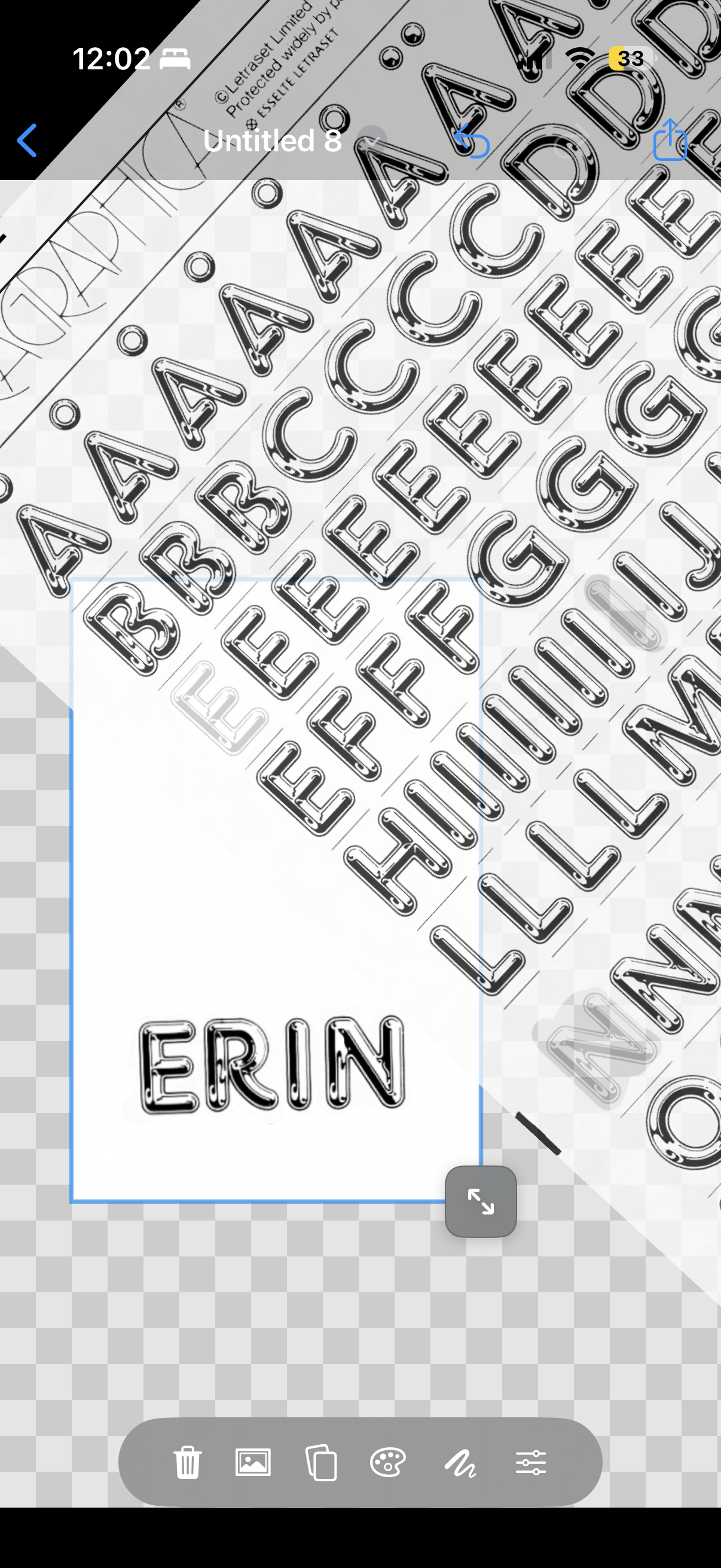
I think my favorite feature is the “custom image as sheet” experience. Any image, as in this screenshot with Chromium via Letraslut, immediately becomes a new usable tool. https://letraslut.com/wiki/index.php?title=File:Chromium_One_72.jpg
#LetterSet #typography #swiftui
Show Original Post
juanarzola (@juanarzola@sfba.social)
In #swiftui sometimes i present popovers directly from buttons so that popovers point to the button. And on design iterations, i may turn those popovers into sheets or whatever.
But just today, I fixed navigation header titles in a presented split view (which were stuck to the first screen's title) by moving the sheet presentation from the button to a parent.
Why? no idea, but I guess the sheet() modifier somehow is very sensitive to the layout of the view it modifies (used to calculate the sheet's own size), and buttons throw it off and surface bugs.
Show Original Post
yanlu (@yanlu@mastodon.social)
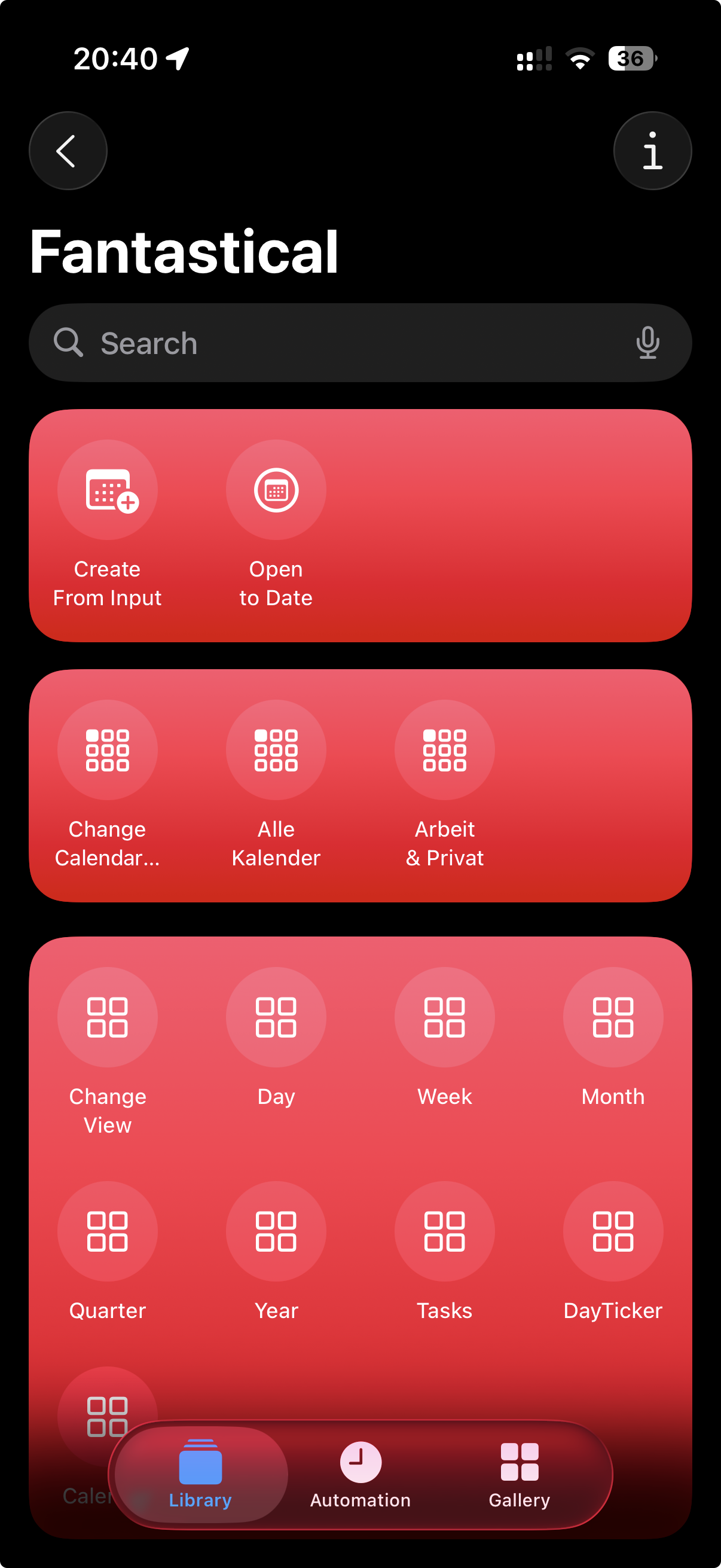
Quick question: how can I create Shortcut groups like these? What are those called?
#SwiftUI
Show Original Post
still_fil (@still_fil@mastodon.social)
🎉 Excited to announce the release of my new iOS game!
Discover a new way to play with music in 16 Tones! Tap colorful rectangles—each plays a tone. Your challenge: move the rectangles so that higher-pitched tones are placed higher up. It’s easy to pick up, relaxing to play, and perfect for training your musical ear.
Try it now on the App Store: https://apps.apple.com/us/app/16-tones-ear-training-grids/id6746161344
#IndieDev #iOSDev #IndieGame #MadeWithSwift #SwiftUI #IndieApps #MobileGame #PuzzleGame #NewRelease

Show Original Post
ellenich (@ellenich@techhub.social)
Kinda fun feature I added to @remainders using #SwiftUI and Apple’s on device #FoundationModels in #iOS26…
I take whatever the user titled the event and pass it into the on device LLM (fast, free, no Internet connection required 🎉), have it generate 3-4 “concepts” based on the title, pass the concepts as an array into the in-app, Image Playground sheet, and generate a cover image for their event.
It’ll even do proper nouns and pull those people into the image (if you’ve set that up).
Show Original Post
bradr3d (@bradr3d@fosstodon.org)
My app that I've been working on for 8 months, TaskFrame, is finally live for preorder!
https://apps.apple.com/us/app/taskframe-task-manager/id6741954921
#iOS26 #BuildInPublic #SwiftUI #TaskManager #Apple #appstore
Show Original Post
patrickmcconnell (@patrickmcconnell@mastodon.social)
The more I work with the current #Xcode, #Swift, #SwiftUI, etc the more obvious it becomes #Apple really never considers support for legacy versions of their OSes.
97% of my time this cycle is fixing things that worked fine before. The new stuff mostly works as advertised, for good or bad.
Show Original Post
JTostitos (@JTostitos@techhub.social)
@SnippetsStudio here is another #ipados26 bug… nice…
When switching from windowed mode to non-windowed mode in iPadOS 26, the traffic light window controls disappear but the toolbar buttons do not reposition themselves causing blank space to appear in the toolbar when it shouldn’t.
#indiedev #iosdev #swift #swiftui
Show Original Post
ryanlintott (@ryanlintott@mastodon.social)
Is ShareLink just broken for images? I find it only works sometimes, for some destinations. It occasionally excludes the filename and if you try to include a message alongside the image it only seems to work in Messages or Notes but not other social media apps.
I've seen alternatives that involve saving a temp file and sharing a URL or dropping down to the older UIActivityViewController but I would rather stick to SwiftUI and Transferrable.
Show Original Post