jpaskaruk (@jpaskaruk@growers.social)
Hey #MPD #RaspberryPi
I am using a combination of MPD and snapcast round the place right now, but others in the house are not quite ready to let go of their streaming addiction lol
But we cannot stomach giving money to Joe Rogan, so we are trying out #Tidal today. What I'm wondering is, what's the most pain-free way to cast Tidal from her desktop to a Raspberry Pi that's across the room and connected to the good speakers?
I have a number of DLNA renderers on the network as well, and for some reason the desktop Tidal client cannot see any of them, or simply installing a renderer on that Pi would be the solution. But perhaps there's an alternative desktop client for Tidal or something? I don't have time today for a protracted lesson in Tidal's interface and unncessary weird language ad stuff.
Show Original Post
b4ux1t3 (@b4ux1t3@hachyderm.io)
Related to some of my previous posts, does anyone have any good recommendations for #RaspberryPi hats for adding storage? e.g. a powered SATA hat?
I see a few things in my searching, but it's hard to tell the quality of these things, would be really helpful to hear from folks who have actually used some of them.
Show Original Post
omgubuntu (@omgubuntu@floss.social)
"I feel like I’ve found a way to do a Dante-less audio-over-ethernet setup that cost me nothing" – creative open-source problem solving from Ubuntu Studio's @eickmeyer, using a Raspberry Pi + JackTrip.
https://ericheickmeyer.com/2025/08/19/raspberry-pi-as-a-networked-audio-interface/
Show Original Post
muimota (@muimota@tldr.nettime.org)
#raspberrypi This is the only reference I've found on how to set up your raspi into kiosk mode with the latest OS.
https://core-electronics.com.au/guides/raspberry-pi-kiosk-mode-setup/#YN2B97P
Show Original Post
RPiSpy (@RPiSpy@mastodon.social)
Charles Babbage’s Analytical Engine | The Computers that Made the World https://www.raspberrypi.com/news/charles-babbages-analytical-engine-the-computers-that-made-the-world/ #RaspberryPi (via Raspberry Pi)
Show Original Post
umbraroze (@umbraroze@tech.lgbt)
Yayyyyy! Found a spare empty microSD card. Imaged it with #RaspberryPi OS. And my Raspberry Pi 4 booted up just fine! So apparently the weird thing that I did earlier just hosed maybe just the kernel or something, or maybe the microSD card was somehow hosed, or something - so that earlier manoeuvre didn't do something weird like fuck up the firmware or whatever.
Now to update the OS and see if the old card still lives and/or what the hell went wrong here. Important point, though, never store anything even remotely important on the RPi SD card. (I'll need to re-setup some dev stuff, which sucks, but it wasn't invaluable, fortunately.)
Show Original Post
beitmenotyou (@beitmenotyou@social.beitmenotyou.online)
What a frustrating day 😩
First at work: we finally managed to get the CCTV working again, and wouldn’t you know it, the same day we had loads of customer “to pays” and drive-offs. On top of that, I was trying to get everything looking nice for the morning, plus doing a bit of cleaning, all while squeezed into the few hours I had. Only two of us on shift, so it felt like a never-ending grind.
Then at home: I tried installing n8n on my Raspberry Pi. That was a headache in itself, but I eventually got it running. The real trouble came when I tried to set up a simple event, basically, I just want it to post a message to my GoToSocial account whenever a friend of mine goes live on Twitch. Sounds easy, right? But nope… I can’t even get the first part working. 🤦
So I’m calling it a night. Tomorrow’s another day, and hopefully I can make it all work and get things hunky dory again. 🌙
#RaspberryPi #SelfHosting #GoToSocial #n8n #Twitch #Frustration #TechLife
Show Original Post
r (@r@fed.brid.gy)
小型USB-C電源制御デバイス「PocketPD」がオープンソースで公開、100g未満で最大100W対応

Show Original Post
r (@r@web.brid.gy)
小型USB-C電源制御デバイス「PocketPD」がオープンソースで公開、100g未満で最大100W対応

Show Original Post
mlepage (@mlepage@mastodon.online)
I did some CAD for USB-A ports for my DIY 7" tablet.
Now to 3D print new sides with the ports, then wire them up to the Raspberry Pi 4B (whose ports were removed to "thin" it).
#maker #3dprinting #raspberrypi #electronics

Show Original Post
paulio87 (@paulio87@hachyderm.io)
I wrote a post on self hosting a Vapor app on a Raspberry Pi
https://paul-samuels.com/blog/2025/08/19/self-hosting-a-vapor-app-on-a-raspberry-pi/
Show Original Post
useidel (@useidel@mastodon.social)
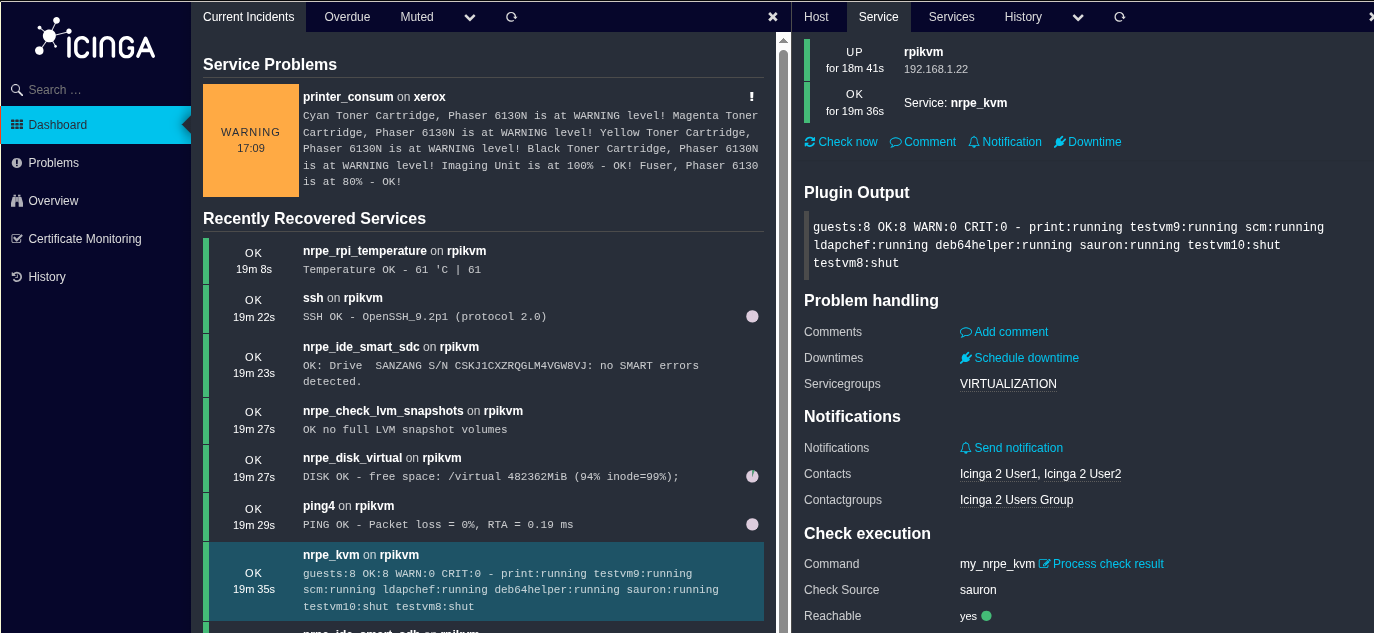
#icinga2 and #icingaweb2 running on #debian #trixie in an #arm64 #kvm guest where the host is a #raspberrypi 5.
Show Original Post