Typ0genius (@Typ0genius@mastodon.social)
Is there any way to make a native #SwiftUI macOS settings window resizable, like the Xcode preferences window? No matter what modifiers I try, I can't get it to work.
Show Original Post
ios_newsletter_snapp (@ios_newsletter_snapp@mastodon.social)
How do you keep long SwiftUI view bodies from becoming unmaintainable? This article shares practical strategies for structuring views that scale with your codebase while maintaining clarity and reusability.
🔗: https://www.avanderlee.com/swiftui/swiftui-architecture-structure-views-for-reusability-and-clarity/ by Antoine van der Lee (@swiftlee)
#SwiftUI #SoftwareArchitecture #iOSDev
Show Original Post
combatwombat (@combatwombat@hachyderm.io)
Lunicode v2 widget theming is making progress. Now with Mac OS Aqua and Platinum themes ᐛ
#BuildInPublic #swiftui #macos

Show Original Post
weetwo (@weetwo@mastodon.gamedev.place)
Nose movement.
The movement isn't realistic—your nose doesn't move like that when you move your eyes left or right—but it exercises the simultaneous animating systems that comprise the face, so it suffices.
Later when, with the moving eyes, the head shape shifts to suggest a head turn, the nose will move more convincingly.
Also, the eye sockets and nose, expressionless single lines here, will need to morph to multiple lines when emoting (i.e., lowered brow).
Show Original Post
puppethead (@puppethead@ieji.de)
I figured out how to do something cool with SwiftUI and a mutating struct using a function that returns a tuple, so right now I'm pretty pleased at how quickly I can combine Swift language capabilities.
Show Original Post
fds (@fds@mastodon.social)
I've fixed a sheet crash in my mac catalyst app that did not appear on an iOS device.
The issue was objects in the environment were not there for the sheet. The fix was replacing the NavigationView with a NavigationStack.
It was my last NavigationView left because it's a debug sheet so as it's not necessarily given the same care as the rest since it's only for me. It appears NavigationView may be more broken in Catalyst than iOS.
Show Original Post
ios_newsletter_snapp (@ios_newsletter_snapp@mastodon.social)
Building macOS apps with SwiftUI? This guide walks through 12 different approaches to creating customizable toolbars, from basic patterns to advanced techniques that give your app a native feel.
🔗: https://ohanaware.com/swift/macOSToolbarExamples.html by 𝗦𝗮𝗺 𝗥𝗼𝘄𝗹𝗮𝗻𝗱𝘀
#SwiftUI #macOSDevelopment #AppDevelopment
Show Original Post
betzerra (@betzerra@iosdev.space)
Coffee Notes 1.14 is “Waiting for Review”
In this version users can scan a coffee bag instead of filling a form manually.
#SwiftUI #iOSDev #BuildInPublic #iOS #coffee
Show Original Post
Kitone (@Kitone@mastodon.social)
https://kitblog.com/namejack-episode-1
I wrote a few things about Namejack, an app that I build and rebuild since 2008. I hope it’s the first episode, out of many, on this (seriously vast) subject.
Show Original Post
gonzalezreal (@gonzalezreal@masto.ai)
One interesting detail in Textual:
Cross-view text selection is implemented by leveraging SwiftUI’s Text.Layout API.
By working at the layout level, selection can span multiple SwiftUI views while still behaving like a single, continuous piece of text.

Show Original Post
swiftdevjournal (@swiftdevjournal@mastodon.world)
SwiftUI instrument tip: take the following steps to find the code causing long updates:
1. Right-click on a red or orange bar in the graph.
2. Choose Set Inspection Range.
3. Switch to the Time Profiler instrument.
4. Hide System Libraries.
5. Double-click a function to see the lines of code causing the long update.
Show Original Post
piotrekjeremicz (@piotrekjeremicz@mastodon.social)
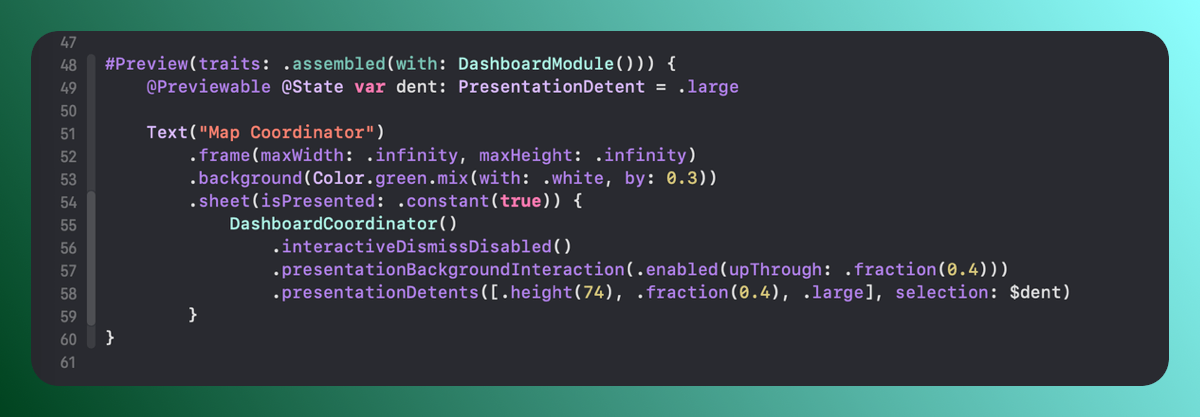
If I have to create a test to check a modular architecture that would work in the #Xcode, it would be the possibility to use #Previews! 🧩
I've heard so many times - we have #SwiftUI but... Previews doesn't work.
Let's do it right! 🌟
#BuildInPublic #DevDiary #iOS #Swift #
Show Original Post