chucker (@chucker@norden.social)
You *can* use #SwiftUI previews, and those are a good start, but they aren’t quite the same.
You can also hack it with https://github.com/krzysztofzablocki/Inject.
Show Original Post
ralfebert (@ralfebert@mastodon.social)
View Transitions in SwiftUI are one of the API's that appear simple at first but are surprisingly tricky in detail. Here's what I have learned about them over the years: https://swiftui-garden.com/Animations/View-Transitions
Show Original Post
danielsaidi (@danielsaidi@mastodon.social)
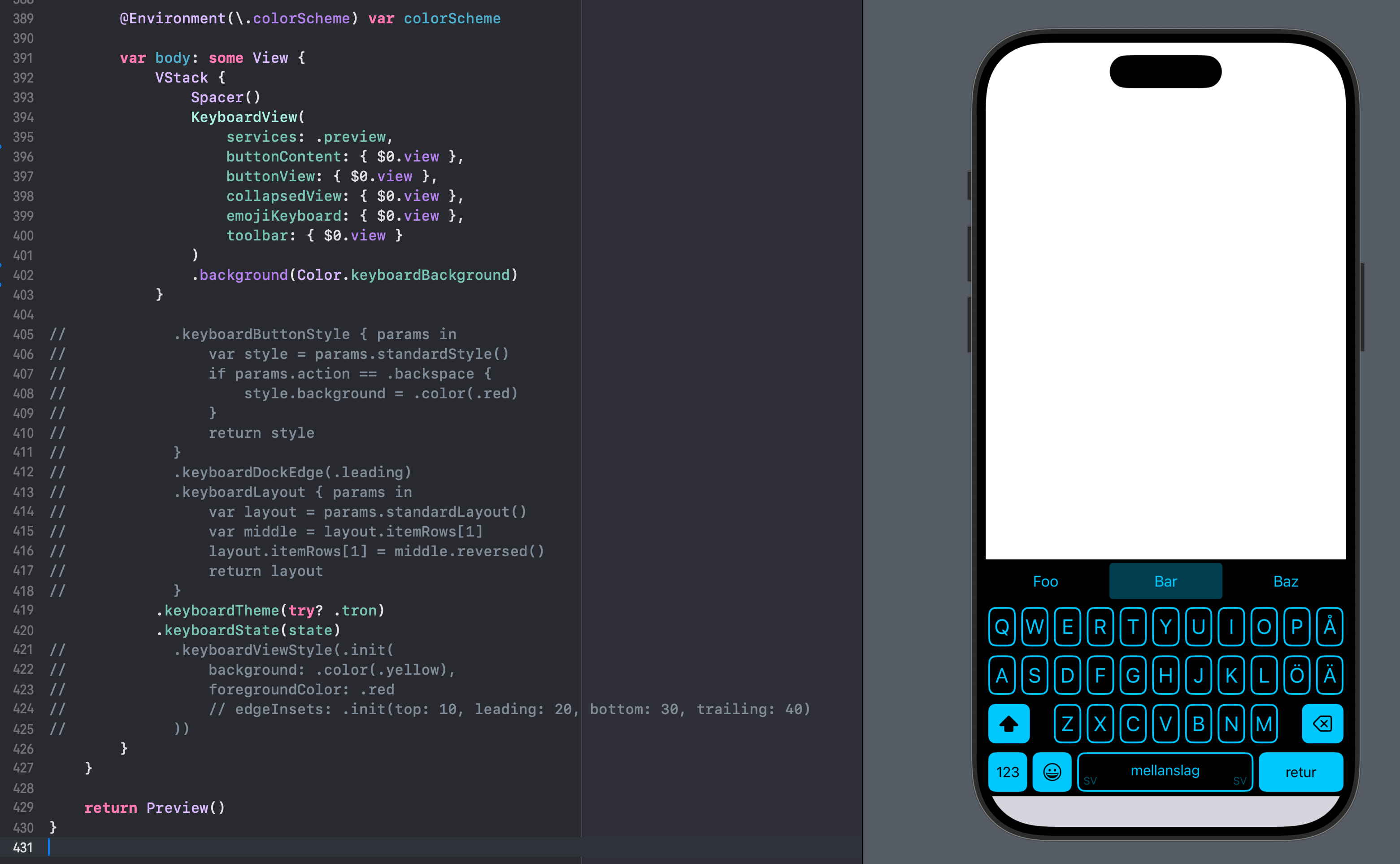
I love #SwiftUI for making UI development amazing on all Apple platforms. Sure, it has many flaws and problems, and it's been a rocky ride since it first launched in 2019, but the fact that I can easily compose views, preview the end result and work on the main KeyboardKit keyboard view in less than 500 lines (or should I say a little more than 400 lines) INCLUDING the preview, is an insane improvement from UIKit.
Show Original Post
countablenewt (@countablenewt@mastodon.social)
Forever balancing my personal enjoyment with #SwiftUI and my belief in the #IndieWeb and the future of the web in general
#WebDevelopment #SwiftLang #Developer #Programming
Show Original Post
troz (@troz@mastodon.social)
I have come to realise that so many of the problems I have with SwiftUI in macOS are caused by NavigationSplitView: FB20114967
Sorting a table - crashes when inside a NSV: FB20056190
Customising a toolbar - crashes when using an NSV: FB20097446
Also, updates not happening and various other oddities that I haven't tracked down in detail yet.
I think I'll switch to using HSplitView instead. Not as pretty but much more reliable.
Show Original Post
otaviocc (@otaviocc@social.lol)
Working on the #Weblog feature in my native macOS app for #omglol.
I'm really happy with the architecture of the app: each feature is basically a mini application. There's a Swift Package for each feature, each with several targets. Everything is isolated. There are more than 50 targets in this app alone.
#Swift #SwiftUI #SwiftConcurrency

Show Original Post
devto_vn_bot (@devto_vn_bot@mastodon.maobui.com)
Tạo #Preview trong SwiftUI dễ dàng hơn với macro #Preview. Để xử lý dữ liệu bất đồng bộ hoặc cache, hãy dùng `PreviewModifier` với `makeSharedContext` để tạo dữ liệu và `body` để hiển thị view.
#SwiftUI #Previews #iOS #LậpTrình #Vietnamese
https://dev.to/stoiandan/how-to-populate-your-previews-in-swiftui-1bio
Show Original Post
dan01 (@dan01@iosdev.space)
I wrote a small introductory article on #Xcode #Previews – how to provide them with data (even async data) via PreviewModifier:
https://dev.to/stoiandan/how-to-populate-your-previews-in-swiftui-1bio
Show Original Post
davidbures (@davidbures@mstdn.social)
It's important to never stop learning, and never stop building. Every project you work on will give you some new skills. For me, those were:
Countless Terminal apps: Basics of Swift itself
Cork: Basics of creating GUI apps and SwiftUI, structured concurrency
Mlem: Networking, authentication, credentials management
Rizzference: SwiftData
My next mini project (TBA soon!): Metatypes and advanced enums
What did your journey look like? I'd love to hear about it
Show Original Post
dimitribouniol (@dimitribouniol@mastodon.social)
Made some improvements to toolbars on iPad, and some sheets on tvOS. Tomorrow, let's fix a few more tvOS bugs then try out building for visionOS. See you then!
🔜 Tomorrow’s stream: https://youtube.com/live/gNeLqhOQu0o
⏮️ Playlist so far: https://www.youtube.com/playlist?list=PLRxjf93xotuofCtaxtGOcWeuxVZYJyY-m
📲 Download Jiiiii: https://apps.apple.com/app/apple-store/id6472801548?pt=14724&ct=MastodonCCStreams&mt=8
#Jiiiii #DevStream #tvOS #visionOS #macOS #iOS #iPadOS #Anime #Swift #SwiftUI #Vapor #WebAuthn #BuildInPublic #TestFlight #PWA #WebPush
Show Original Post
dimitribouniol (@dimitribouniol@mastodon.social)
I'm making a seasonal anime guide app, in the open for all to experience and learn from.
Another short stream, but let's fix the toolbars on iPad!
#Jiiiii #DevStream #tvOS #visionOS #macOS #iOS #iPadOS #Anime #SwiftLang #SwiftUI #Vapor #WebAuthn #BuildInPublic #TestFlight #PWA #WebPush
Come chill with me: https://youtube.com/live/i_X7lnzm_ac
Show Original Post
piotrekjeremicz (@piotrekjeremicz@mastodon.social)
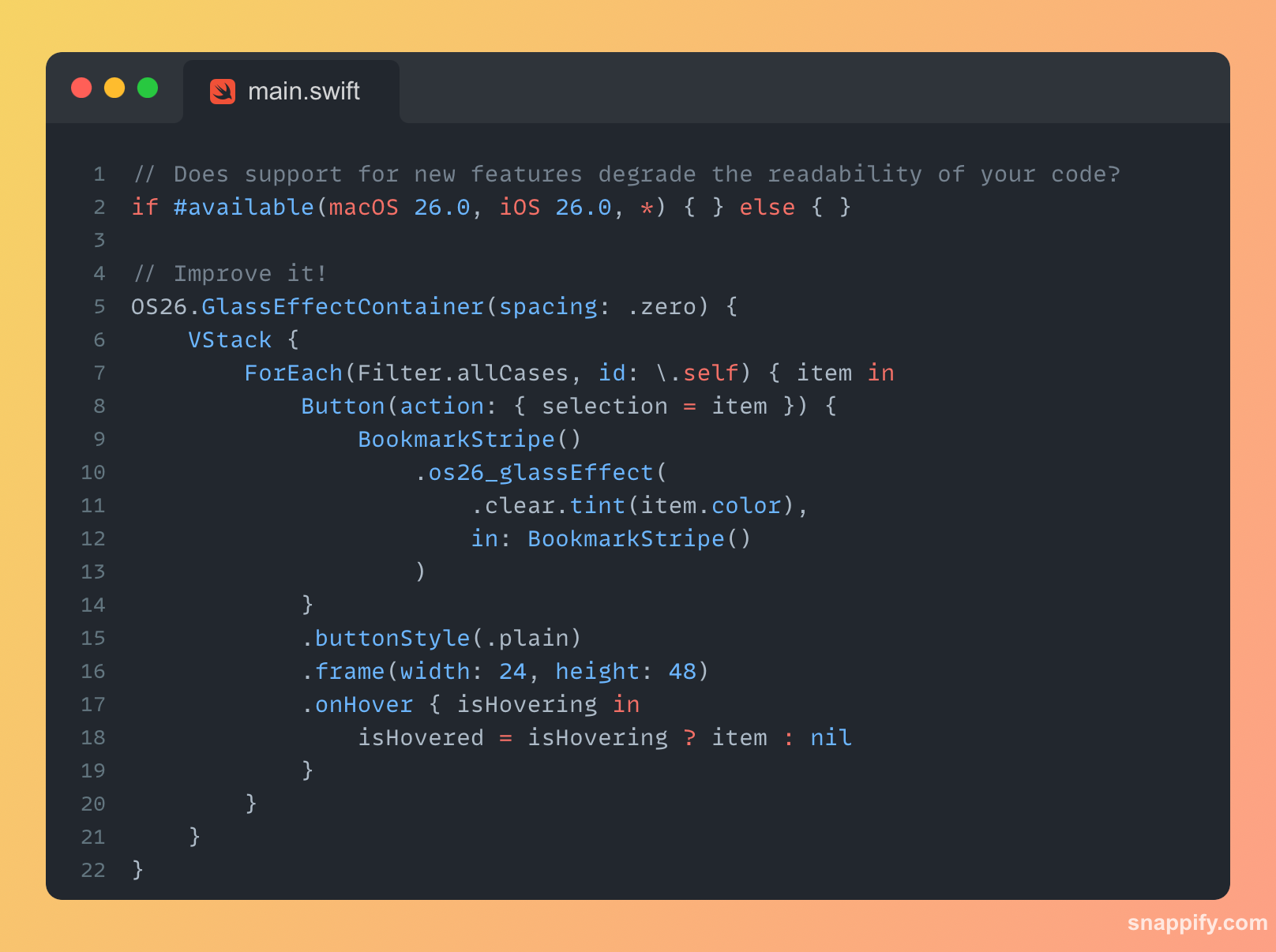
New #iOS26 and #macOS26 are just around the corner, but that means a lot of `if #available` in the code... 📱
#SwiftUI often involves significant nesting, leading to very deep indentations. Adding another `if` doesn't simplify things. 🤔
What if it could be better? 🚀
Show Original Post