ios_newsletter_snapp (@ios_newsletter_snapp@mastodon.social)
Why don't SwiftUI tasks re-run when your view properties change? Task identity is the key to understanding dependency tracking. Master this concept and predict async behavior with confidence.
🔗 https://chris.eidhof.nl/post/swiftui-task-identity/ by Chris Eidhof
Show Original Post
countablenewt (@countablenewt@mastodon.social)
It’s kinda fun that you can go from a local app to a multi-platform client/server app using #SwiftUI and #SwiftData with very few changes to your data model and with no changes to the APIs you call
#SwiftLang #BuildInPublic #Technology #Apple #CloudKit #Apps
Show Original Post
countablenewt (@countablenewt@mastodon.social)
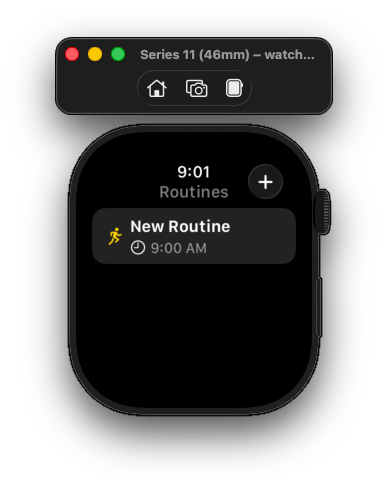
It doesn’t work or anything, but I’ve built and installed a watchOS version of Routines
#iOSDev #SwiftUI #watchOS #Technology #Apps #Apple #BuildInPublic
Show Original Post
stendap_sogodni (@stendap_sogodni@social.shevtsov.me)
Ідіосинкразії SwiftUI
Я дуже люблю React за його передбачуваність. Якщо створити компонент-функцію, вся вона буде виконана. Хуки теж мають передбачувані моменти виклику. React не ідеальний, але ось ця прозорість точно його сильна сторона.
У SwiftUI прозорості немає. Життєвий цикл компоненти заплутаний. Хочу я робити запит, який приймає в себе аргумент компоненти, умовно Action.where { $0.contextID == contextID }. Цілком нормальна справа. Написати це прямо в анотації @FetchAll, як каже документація — не вийде. Бо анотації не мають доступу до аргументів — хоч цей запит наче буде виконаний вже в конкретному екземплярі.
Тоді є документація про динамічні запити... це трохи не те, але працювати буде. Воно використовує метод .task. І це ще треба знати — я сьогодні дізнався — що в нього є аргумент id, який насправді працює так само як масив залежностей у React.useEffect.
Але. Якщо запит розташований в .task, він буде виконаний із затримкою та вам не уникнути початкового вигляду із порожнім результатом. Не ідеально.
Тоді залишається інший спосіб, якого в документації немає — це зробити власний ініціалізатор (конструктор) - він й приймає всі аргументи компоненти — та там завантажувати всі правильні запити. Оце і є вихід.
Тільки й це не все розвʼязує, бо ініціалізатор не має доступу до обʼєктів @Environment (це як контексти в React.) Так що якщо ти раптом береш значення звідти — доведеться робити це в батьківській компоненті та передавати аргументами туди, де збираєшся робити запити.
Складно уявити, що тут теж є концепція, яка все це робить логічним, а не просто збігом обставин реалізації.
Також додам, що XCode це єдине, що дійсно змушує мене замислитись про перехід з MacBook Air до чогось... важчого. А мені не хочеться.
Show Original Post
swiftdevjournal (@swiftdevjournal@mastodon.world)
The following article shows how to use Instruments to find the SwiftUI views that update the most in your apps and see what triggers the updates:
https://swiftdevjournal.com/posts/swiftui-frequent-view-updates/
Show Original Post
beckwahn (@beckwahn@mastodon.social)
I’ve been experimenting with a tiny physics game for the Apple Watch, mostly just for fun and to explore what’s possible on such a small device.
A big challenge was nailing each model’s corner radius and aligning the bezel to the gameplay.
If you’ve built anything for watchOS:
What device‑specific details bugged you while building for watchOS?
https://apps.apple.com/us/app/ploepp/id6754898407
#watchOS #Swift #SwiftUI #SpriteKit #GameDev #IndieDev
Show Original Post
dimitribouniol (@dimitribouniol@mastodon.social)
Came up with a workable scheme for tracking public lists across sync requests. Tomorrow, let's add tests to make sure it works, and update entry indices. See you then!
🔜 Tomorrow’s stream: https://youtube.com/live/Gvf3iv8gUhQ
⏮️ Playlist so far: https://www.youtube.com/playlist?list=PLRxjf93xotuofCtaxtGOcWeuxVZYJyY-m
📲 Download Jiiiii: https://apps.apple.com/app/apple-store/id6472801548?pt=14724&ct=MastodonCCStreams&mt=8
#Jiiiii #DevStream #tvOS #visionOS #macOS #iOS #iPadOS #Anime #Swift #SwiftUI #Vapor #WebAuthn #BuildInPublic #TestFlight #PWA #WebPush
Show Original Post
dimitribouniol (@dimitribouniol@mastodon.social)
I'm making a seasonal anime guide app, in the open for all to experience and learn from.
Short stream today, but let's think about how to add sync cursors keyed by public lists!
#Jiiiii #DevStream #tvOS #visionOS #macOS #iOS #iPadOS #Anime #SwiftLang #SwiftUI #Vapor #WebAuthn #BuildInPublic #TestFlight #PWA #WebPush
Come chill with me: https://youtube.com/live/RIDLeG5p3ck
Show Original Post
vrgz_ (@vrgz_@mastodon.social)
Testing the achievement sharing feature of my new app with different settings. Light/dark portrait/square #swiftui #BuildInPublic

Show Original Post
emilyselect (@emilyselect@mastodon.social)
【初心者向け】Swift言語の基礎文法:スコープ(変数の有効範囲)を学ぼう!
#CodeCandy #private #Swift #SwiftUI #TickleCode #スコープ #Swift基礎・入門 #Swift基礎・入門 #CodeCandy #private #Swift #SwiftUI #TickleCode #スコープ

Show Original Post
0xWDG (@0xWDG@mastodon.social)
Monospace digits https://wesleydegroot.nl/blog/monospace-digits #SwiftUI #Monospace
Show Original Post
amyworrall (@amyworrall@mastodon.social)
Anyone got a good modern guide/blog post about the #SwiftUI focus system?
I’m wrapping a TextField in a MyReusableTextField view. I want users of my view to be able to bind focus as normal, and it get applied to the internal wrapped text field. But I also need to be able to bind to the text field's focus from within my custom view itself, as I draw certain things differently depending on if the text field is focussed.
Or am I being stupid and .focused will correctly traverse child views?
Show Original Post