PeteLittle (@PeteLittle@autistics.life)
Ever buy something for a project then forget about said project and subsequently forget you'd ever bought items only to stumble across them later and wonder why and when you purchased them?
Guess what? I had no idea i had these. No idea what I was planning to do with them then and little to no idea of what to do with them now XD
Pi ZERO W and a Pi CM4

Show Original Post
Donato (@Donato@troet.cafe)
Habt Ihr noch eine Raspberry Pi übrig den Ihr nicht nutzt?
Sucht Ihr ein überschaubares neues Bastelprojekt?
Dann habe ich folgendes für euch gefunden:
https://makerworld.com/de/models/2394718-under-cabinet-weather-clock-case#profileId-2623970
Video:
https://youtu.be/MFlw5Dr3YBI?si=jlTjGUsqr-RfPxqC
#raspberrypi
#basteln
#elektronik

Show Original Post
r (@r@fed.brid.gy)
Raspberry Pi CM5 mini-ITX-compatible carrier board features up to nine Ethernet ports for NVR, Smart Home, and Edge AI applications
Show Original Post
r (@r@fed.brid.gy)
Exaviz Cruiser Brings 8-Port PoE+, 2.5GbE, and NVMe to Raspberry Pi CM5

Show Original Post
jim__ (@jim__@mastodon.social)
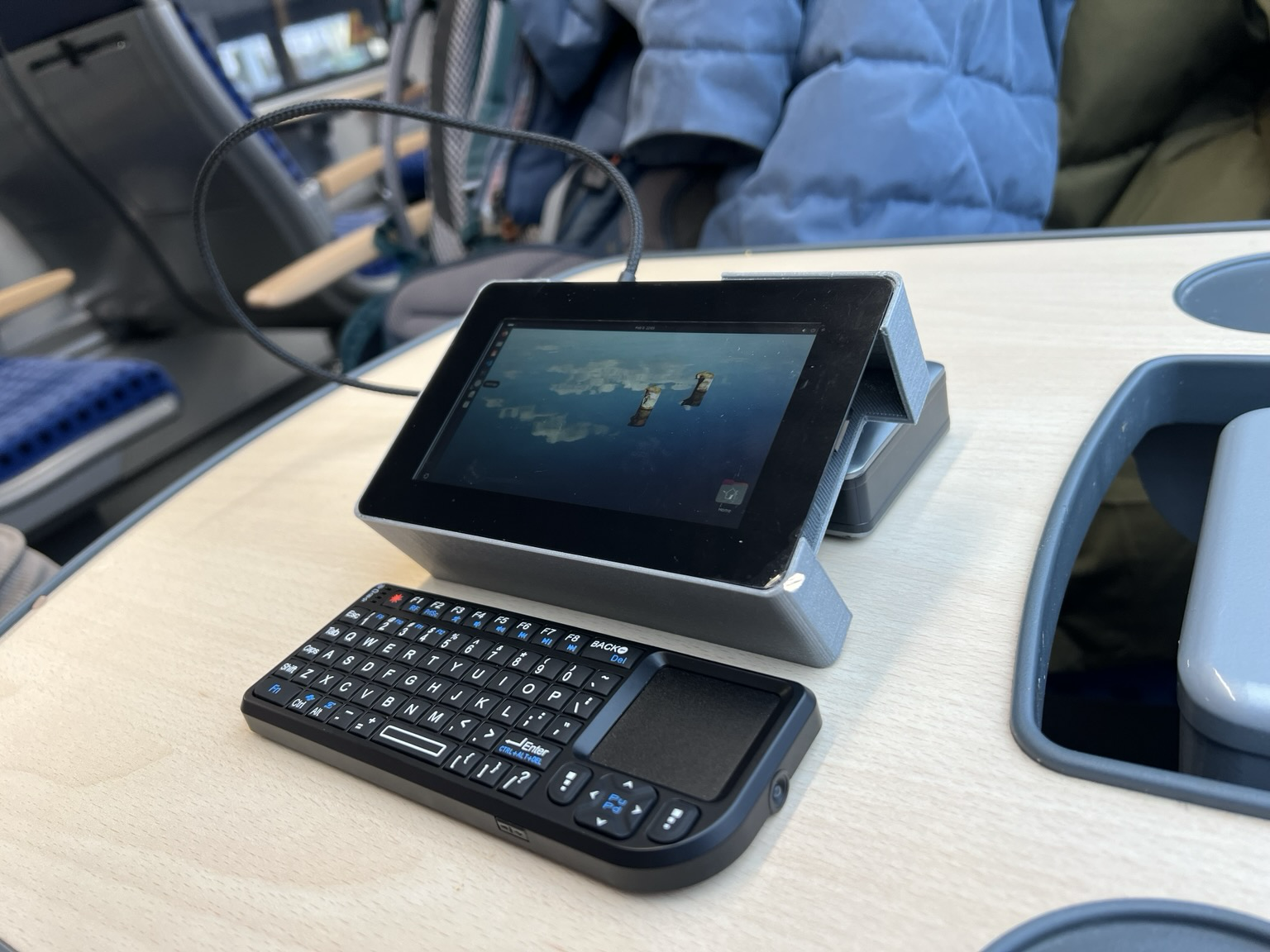
I wanted an emergency computer to take traveling: enough to run dev servers and ssh, without needing to drag a laptop around. I had an old #raspberrypi lying around, and bought the new Raspi Display 2 which has a great resolution. 3D printed case from filament I found in the street. Small 12e wireless keyboard is surprisingly usable. Getting SD Card encryption running was the hardest thing. Worked out way cheaper than the other options.
Show Original Post
jim__ (@jim__@mastodon.social)
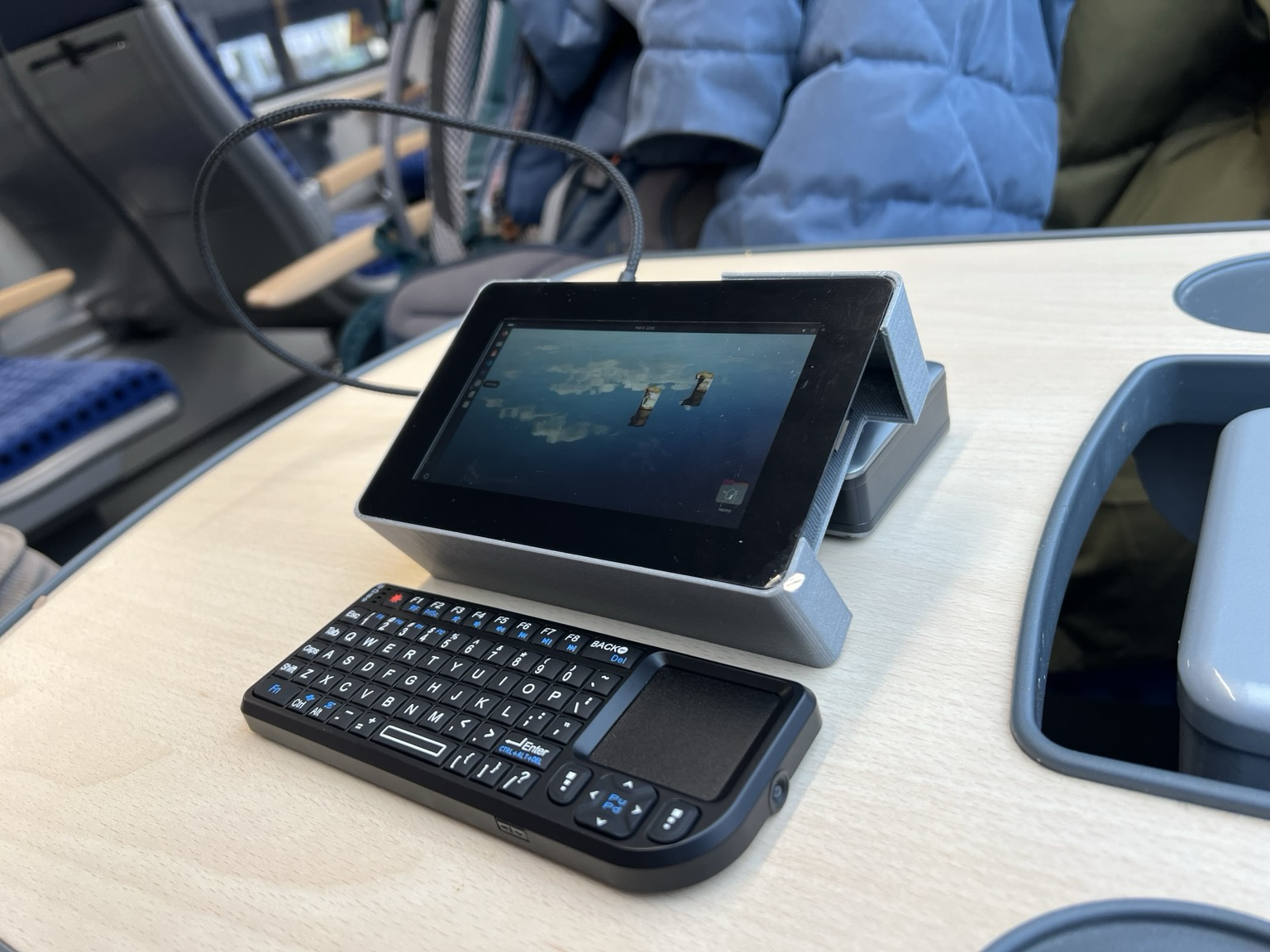
I wanted an emergency computer to take traveling: enough to run dev servers and ssh, without needing to drag a laptop around. I had an old #raspberrypi lying around, and got the new Raspi Display 2 which has a great resolution. 3D printed case from filament I found in the street. Getting SD Card encryption running was the hardest thing. Worked out way cheaper than the other options.
Show Original Post
nicobo (@nicobo@mastodon.social)
First time I noticed #cloudInit it was using a noticeable part of the CPUs...
#RaspberryPi says it's for the first install, and I agree it's useful, a bit better that the old /boot/config.txt. But then it sticks around, why ?
I suspect it caused the recent crashes and/or interferes with my #ansible setup on my older Raspis 2 & 3...
Show Original Post
stream-video-from-raspberry-pi-zero-w-camera-in-2026 (@stream-video-from-raspberry-pi-zero-w-camera-in-2026@blog.rozman.info)
**Stream video from Raspberry Pi Zero W camera in 2026**
TL;DR
I wanted to revive my old Raspberry Pi Zero W camera and stream it to Home Assistant.
I made it work via libcamera2 (mjpeg stream). If I compare it with ESP32 Cam, it’s resolution and fps is better, but it’s more complex to set it up.
Long story
RBPi camera used to work when I bought it (2018) – stream using uv4l, but now (in 2026) and with new version of Raspbian OS, it doesn’t.
Which streaming tools I’ve tried and didn’t manage to get them work:
- Motion
- Uv4l
- mjpeg-streamer1
- gstreamer
Libcamera2 and Python streaming server
Lastly I’ve found libcamera2 python code2 (mjpeg_server2.py3)and it works. I can stream MJPEG stream to Home Assistant. The code:
#!/usr/bin/python3

# This is the same as mjpeg_server.py, but uses the h/w MJPEG encoder.

import io
import logging
import socketserver
from http import server
from threading import Condition

from picamera2 import Picamera2
from picamera2.encoders import MJPEGEncoder
from picamera2.outputs import FileOutput

PAGE = """\
<html>
<head>
<title>picamera2 MJPEG streaming demo</title>
</head>
<body>
<h1>Picamera2 MJPEG Streaming Demo</h1>
<img src="stream.mjpg" width="640" height="480" />
</body>
</html>
"""


class StreamingOutput(io.BufferedIOBase):
    def __init__(self):
        self.frame = None
        self.condition = Condition()

    def write(self, buf):
        with self.condition:
            self.frame = buf
            self.condition.notify_all()


class StreamingHandler(server.BaseHTTPRequestHandler):
    def do_GET(self):
        if self.path == '/':
            self.send_response(301)
            self.send_header('Location', '/index.html')
            self.end_headers()
        elif self.path == '/index.html':
            content = PAGE.encode('utf-8')
            self.send_response(200)
            self.send_header('Content-Type', 'text/html')
            self.send_header('Content-Length', len(content))
            self.end_headers()
            self.wfile.write(content)
        elif self.path == '/stream.mjpg':
            self.send_response(200)
            self.send_header('Age', 0)
            self.send_header('Cache-Control', 'no-cache, private')
            self.send_header('Pragma', 'no-cache')
            self.send_header('Content-Type', 'multipart/x-mixed-replace; boundary=FRAME')
            self.end_headers()
            try:
                while True:
                    with output.condition:
                        output.condition.wait()
                        frame = output.frame
                    self.wfile.write(b'--FRAME\r\n')
                    self.send_header('Content-Type', 'image/jpeg')
                    self.send_header('Content-Length', len(frame))
                    self.end_headers()
                    self.wfile.write(frame)
                    self.wfile.write(b'\r\n')
            except Exception as e:
                logging.warning(
                    'Removed streaming client %s: %s',
                    self.client_address, str(e))
        else:
            self.send_error(404)
            self.end_headers()


class StreamingServer(socketserver.ThreadingMixIn, server.HTTPServer):
    allow_reuse_address = True
    daemon_threads = True


picam2 = Picamera2()
picam2.video_configuration.controls.FrameRate = 5.0

picam2.configure(picam2.create_video_configuration(main={"size": (800, 600)}))
output = StreamingOutput()
picam2.start_recording(MJPEGEncoder(), FileOutput(output))

try:
    address = ('', 8000)
    server = StreamingServer(address, StreamingHandler)
    server.serve_forever()
finally:
    picam2.stop_recording()
Starting with python mystreamer.py.
Now I can finally see what is happening in my aqarium:
It works ok, but when my ssh connection closes, the python program terminates and it doesn’t stream anymore.
So I made it as a systemd service:
nano /etc/systemd/system/mystreamer.service
mystreamer.service looks like:
[Unit]
# Human readable name of the unit
Description=Python MJPEG web streamer
After=network-online.target
Wants=network-online.target

[Service]
Type=simple
User=tomi
WorkingDirectory=/home/tomi/mymjpeg
ExecStart=/usr/bin/python /home/tomi/mymjpeg/mystreamer.py

Restart=on-failure
RestartSec=10
StartLimitIntervalSec=60
StartLimitBurst=3

Environment=PYTHONUNBUFFERED=1
StandardOutput=journal
StandardError=journal

CPUQuota=70%
MemoryMax=300M
Nice=10


[Install]
WantedBy=multi-user.target
Start the service:
sudo systemctl start mystreamer.serviceStatus?
sudo systemctl status mystreamer.serviceSee logs:
sudo journalctl -u mystreamer.service -fEnable it (autostart at boot):
sudo systemctl enable mystreamer.serviceCheck if enabled:
systemctl is-enabled mystreamer.serviceAnd finally, reboot and see if it starts:
sudo systemctl reboot
Then I modified .py code and made a mistake. Pi booted, but the service restarted every few seconds. I couldn’t even ssh to Pi.
What now?
I took SD card out of PI, put it in my computer, edited faulty .py code, put it back to RBPi, booted and I could SSH again.
Bottomline: streaming now works, but the poor PI’s CPU is at 100% (60% python streaming server, 30% glances).
Streaming H.264?
Raspberry Pi camera can also stream H.264 video, but I didn’t know how to integrate it in Home Assistant.
The command is:
libcamera-vid -t 0 --inline --listen -o tcp://0.0.0.0:8888
If anyone knows how to put this stream to HA, please let me know.
Footnotes
- https://krystof.io/mjpg-streamer-on-a-raspberry-pi-zero-w-with-a-usb-webcam-streaming-setup/ ↩︎
- https://github.com/raspberrypi/picamera2 ↩︎
- https://github.com/raspberrypi/picamera2/blob/main/examples/mjpeg_server_2.py ↩︎

Show Original Post
notes (@notes@federation.network)
Hey ich bin krank, aber ich hab mir grade meine eigene Anytype Node auf meinem Raspi eingerichtet. Und ihr so?
#anytype #raspberrypi #selfhosting
Show Original Post
ukscone (@ukscone@cupoftea.social)
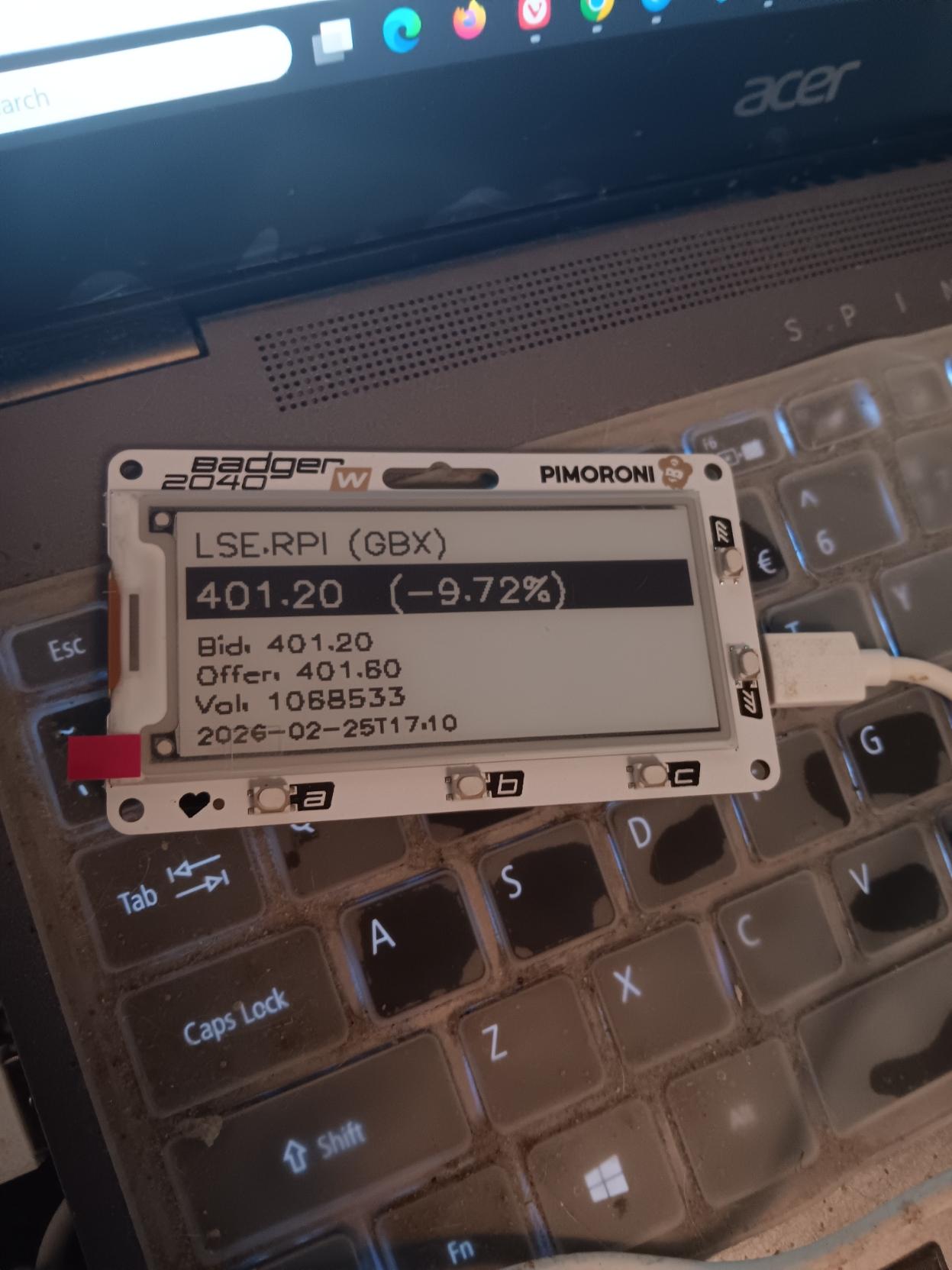
Messing around with the #pimoroni badger2040w and the #raspberrypi LSE listing
Show Original Post
conansysadmin (@conansysadmin@mstdn.social)
This Brittanic child-wizard's device can listen to flying machinery. #RaspberryPi #Linux #OpenSource https://cromwell-intl.com/open-source/raspberry-pi/sdr-ads-b-flight-tracking.html?s=mc
Show Original Post
type (@type@literatur.social)
@tobiaskraft @stefan_hessbrueggen @toroe
Das wollte ich vorher eigentlich auch noch fragen: Bekommen wir die Komplexitäten digitaler #Edition en in einen #EPUB wrapper hinein, ohne Komplexität zu verlieren?
Alle Listen hinten in html:table hinein, die tei:header auch?
Dann könnte man, wie Jan Odstrčlik das in der Diskussion angesprochen hat, auch billige E-Ink-Devices an die Stelle der von @jorisvanzundert vorgeschlagenen #raspberrypi stellen? Kostet weniger mit Screen und SD-Card…
Show Original Post