emaechler (@emaechler@masto.maechler.cloud)
ich bin gerade am entpuffen meiner halben #vibecoded #plugin für #wordpress...
Show Original Post
StellaQuasten (@StellaQuasten@mastodon.nl)
Af en toe kijk ik nog wel eens op mijn destijds fanatiek bijgehouden #wordpress als ik iets lees over de politiek in #Enkhuizen en ergens door getriggerd word. Ik verbaas me nog steeds hoe ik dat toen allemaal deed als éénpitter en #digikneus zijnde.
https://stellaquasten.wordpress.com/2015/03/04/praatje-pot/
Show Original Post
VincentBreton (@VincentBreton@piaille.fr)
j'avais trop froid, j'en ai profité pour bricoler mon site #wordPress
https://vincentbreton.fr/apprendre-a-bricoler-son-site-pour-mieux-le-comprendre/
Show Original Post
novaTopFlex (@novaTopFlex@mastodon.social)
New posts are now available at https://novatopflex.wordpress.com #WordPress about the States of the #MountainWest and the #GreatPlains!
Show Original Post
equalizedigital (@equalizedigital@mastodon.social)
Join Steve Jones, CTO, and William Patton, Senior Plugin Developer, in half an hour while they break down how you can have more control and less friction using Accessibility Checker! #a11y #WebAccessibility #WordPress
https://www.youtube.com/live/LTtkq_SH2eA
Show Original Post
wpbot (@wpbot@wptoots.social)
WordPress 7.0 Release Candidate 2 https://wordpress.org/news/2026/03/wordpress-7-0-release-candidate-2/ #WordPress #wpnotices
Show Original Post
WordPress (@WordPress@mastodon.world)
WordPress 7.0 Release Candidate 2 is now available. The final release is scheduled for April 9, 2026. You can test using the WordPress Beta Tester plugin, a direct download, WP-CLI, or directly in your browser via WordPress Playground. RC2 also marks the hard string freeze for translators. Test it in a safe environment and report any issues. https://wp.me/pZhYe-5hO

Show Original Post
2026 (@2026@lostfocus.de)
human.json is exactly the kind of nerdy metadata silliness that is designed to amuse me. It’s a protocol to vouch for people’s websites created by Beto Dealmeida.
It basically works by offering a little json file with a list of websites one trusts to be human who doesn’t use AI to write their blog posts. It’s nice and not super complex. So after reading about it on Terence Eden’s blog I knew that I needed to add this to this website as well.
I turned it into a WordPress plugin, which you can download here at Codeberg.
As for me – for now I added people I have met in real life. Maybe I’ll add people I only know online but still know for a fact that they’re humans. We’ll see.
#humanJson #Wordpress #WordpressPluginShow Original Post
amberhinds (@amberhinds@fosstodon.org)
Are you into #BuildInPublic? My partner, Steve, and our dev, William, are livestreaming right now about changes in our Accessibility Checker #WordPress plugin. Tune in!! ⤵️
https://www.youtube.com/watch?v=LTtkq_SH2eA
Show Original Post
strg-k-der-wichtigste-shortcut-in-wordpress-7-0 (@strg-k-der-wichtigste-shortcut-in-wordpress-7-0@haurand.com)
STRG + K – Der wichtigste Shortcut in WordPress 7.0
In diesem Beitrag zeige ich, warum STRG + K absolut hilfreich ist, um im Block-Editor effizient arbeiten zu können. Am Ende des Beitrags gibt es noch die aktuelle Liste mit allen Shortcuts von WordPress 7.0.
https://haurand.com/strg-k-der-wichtigste-shortcut-in-wordpress-7-0/ #WordPress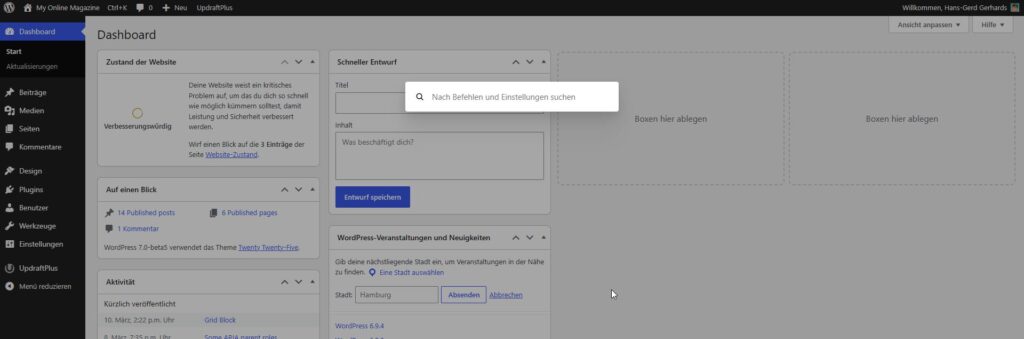
Show Original Post
donncha (@donncha@mastodon.ie)
Stopping Web Server Abuse with Fail2Ban
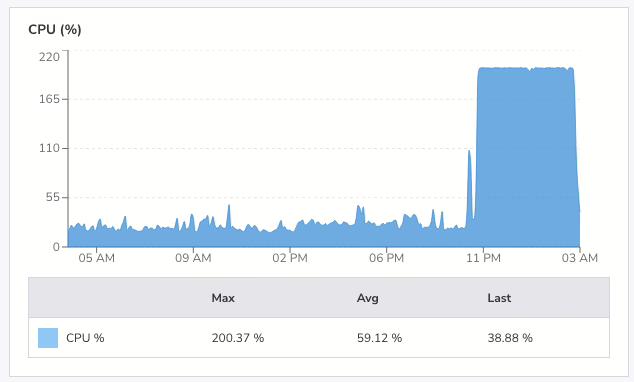
At 4am yesterday morning I was awake. Luckily so, as I checked my email and saw a warning that my VPS had been running at 199% CPU for two hours. I went into my office and checked the logs. Someone had been hammering this site with HEAD requests since just after midnight with nearly 30,000Continue reading
https://odd.blog/2026/03/26/stopping-web-server-abuse-with-fail2ban/
#Apache2 #fail2ban #WordPress
Show Original Post
2026 (@2026@odd.blog)
Stopping Web Server Abuse with Fail2Ban
At 4am yesterday morning I was awake. Luckily so, as I checked my email and saw a warning that my VPS had been running at 199% CPU for two hours. I went into my office and checked the logs. Someone had been hammering this site with HEAD requests since just after midnight with nearly 30,000 requests across different URLs in four hours.
If they’d hit the same page repeatedly, cached responses would have handled it. But by requesting thousands of distinct URLs, each request generated a fresh cache file, forcing PHP and the database to do real work every time. My small server was coping, but the load average was high.
I blocked the offending IP in .htaccess immediately. That stopped requests from reaching PHP, but I wanted a proper defence, something that would catch this kind of abuse automatically next time.
I already had Fail2Ban installed. I’d just never configured it for web server attacks. Time to do that.
Fail2Ban works by watching log files for patterns, then banning IPs that match too often. I needed two files: a filter to match Apache access log lines, and a jail to define the thresholds.
First, the filter at /etc/fail2ban/filter.d/apache-ratelimit.conf:
[Definition]

# Matches any request line in Apache access log (combined/common format)
failregex = ^<HOST> -."(GET|HEAD|POST|PUT|DELETE|OPTIONS) .

ignoreregex =
This matches every request in the log.
The jail decides what volume of requests counts as abuse. It lives at /etc/fail2ban/jail.d/apache-ratelimit.conf:
[apache-ratelimit]
enabled = true
filter = apache-ratelimit
logpath = /var/www/logs/access.log

# Triggers a ban after too many requests in a short window
maxretry = 500
findtime = 30

# Ban for 24 hours
bantime = 86400

# Use iptables to drop packets from banned IPs
banaction = iptables-multiport
port = http,https
protocol = tcp

# Allowlist trusted networks
ignoreip = 127.0.0.1
The logic: if a single IP makes more than 500 requests in 30 seconds then ban it for 24 hours. Adjust maxretry and findtime to suit your traffic patterns. Legitimate crawlers and real users won’t come close to these numbers, but an attacker blasting thousands
of requests will trip the threshold fast. These are not the numbers I’m using.
The ignoreip directive keeps trusted networks (monitoring services, your own IPs) from getting caught.
The changes to Fail2Ban are activated with the following command (as root):
systemctl restart fail2ban
And I verified it was running by checking the status:
fail2ban-client status apache-ratelimit
Within a couple of minutes, the offending IP appeared in the banned list. I checked the access log, and there was nothing more from that IP. The requests weren’t just being rejected by Apache; iptables was dropping the packets before they reached the web server at all.
That’s the key advantage over an .htaccess block: banned traffic never touches Apache.
A VPS with limited resources can’t absorb a flood of uncached requests. Caching helps with repeat visits to the same page, but an attacker who rotates URLs defeats that entirely. Fail2Ban shifts the defence from the application layer down to the network
layer, where it’s cheap to enforce.
If you run a small site on a VPS, configure fail2ban for your web server. It takes ten minutes and it works.
Anyway, I presume whoever did that attack is reading this post since they seem to like my blog so much. Why did you do it?
#Apache2 #fail2ban #WordPress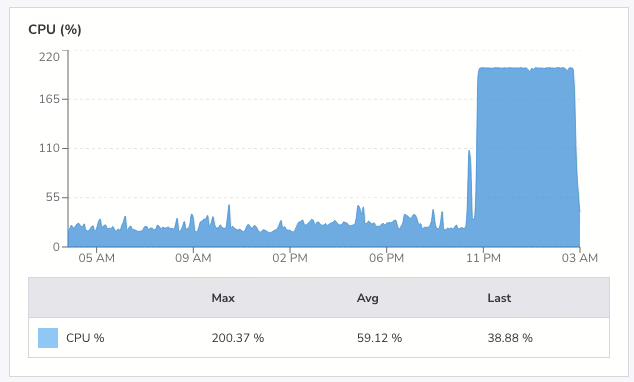
Show Original Post