GripNews (@GripNews@mastodon.social)
🌘 Nallely MIDI:一個可駭的 MIDI 與訊號實驗平臺
➤ 用 Python 建構你的數位神經網路:Nallely 重新定義 MIDI 訊號實驗
✤ https://dr-schlange.github.io/nallely-midi/
Nallely 是一款創新的開源 Python 平臺,專為訊號處理和模組化合成器創作而設計。它讓使用者能從任何訊號來源(MIDI 裝置、感測器、網路攝影機,甚至其他網路電腦)建立自訂的模組化樂器或裝置。透過生成、轉換、過濾或分割訊號,再將其導回 MIDI 裝置或 Nallely 會話中的任何應用程式,Nallely 支援即時編碼、複雜 MIDI 路由、生成式音樂和多模態藝術,提供極大的實驗自由度。
+ 太酷了!終於有一個平臺讓我能把各種怪奇訊號都串起來玩音樂了!
+ 這個概念聽起來很有趣,特別是「神經元」的比喻,感覺能創造出很多意想不到的聲音。
#MIDI #訊號處理 #開源 #Python #模組化音樂 #創意程式設計
Show Original Post
voltagex (@voltagex@aus.social)
This is not a helpful error message, #Python
ValueError: invalid pyproject.toml config: `project.version`.
configuration error: `project.version` must be pep440
(Wonder if they'd accept a pull request?)
Show Original Post
ngate (@ngate@mastodon.social)
🎹 Ah, yet another #Python project inspired by #Smalltalk, because clearly that's what the world was desperately lacking! 😆 Nallely MIDI: the cutting-edge innovation you never asked for, delivering the thrilling experience of both signals and MIDI processing in one forgettable package. 🎛️
https://dr-schlange.github.io/nallely-midi/ #NallelyMIDI #MIDIProcessing #TechInnovation #HackerNews #ngated
Show Original Post
h4ckernews (@h4ckernews@mastodon.social)
Nallely – A Python signals/MIDI processing system inspired by Smalltalk
https://dr-schlange.github.io/nallely-midi/
#HackerNews #Nallely #Python #MIDI #Smalltalk #signals #processing
Show Original Post
CuratedHackerNews (@CuratedHackerNews@mastodon.social)
Show HN: Nallely – A Python signals/MIDI processing system inspired by Smalltalk
https://dr-schlange.github.io/nallely-midi/
Show Original Post
CuratedHackerNews (@CuratedHackerNews@mastodon.social)
Nvmath-Python: Nvidia Math Libraries for the Python Ecosystem
https://github.com/NVIDIA/nvmath-python
Show Original Post
villares (@villares@pynews.com.br)
Code at: https://github.com/villares/sketch-a-day/tree/main/2025/sketch_2025_09_18
More sketch-a-day: https://abav.lugaralgum.com/sketch-a-day
If you like this, support my work:
https://www.paypal.com/donate/?hosted_button_id=5B4MZ78C9J724
https://liberapay.com/Villares
https://wise.com/pay/me/alexandrev562 #Processing #Python #py5 #CreativeCoding
Show Original Post
qiita (@qiita@rss-mstdn.studiofreesia.com)
【Python】生成AIがこのコード書いたら気をつけろ! - 事故らないためのチェックリスト
https://qiita.com/Sakai_path/items/d4ec1e848672033ca256?utm_campaign=popular_items&utm_medium=feed&utm_source=popular_items
#qiita #Python #Security #初心者 #AI #コードレビュー
Show Original Post
cryptadamist (@cryptadamist@universeodon.com)
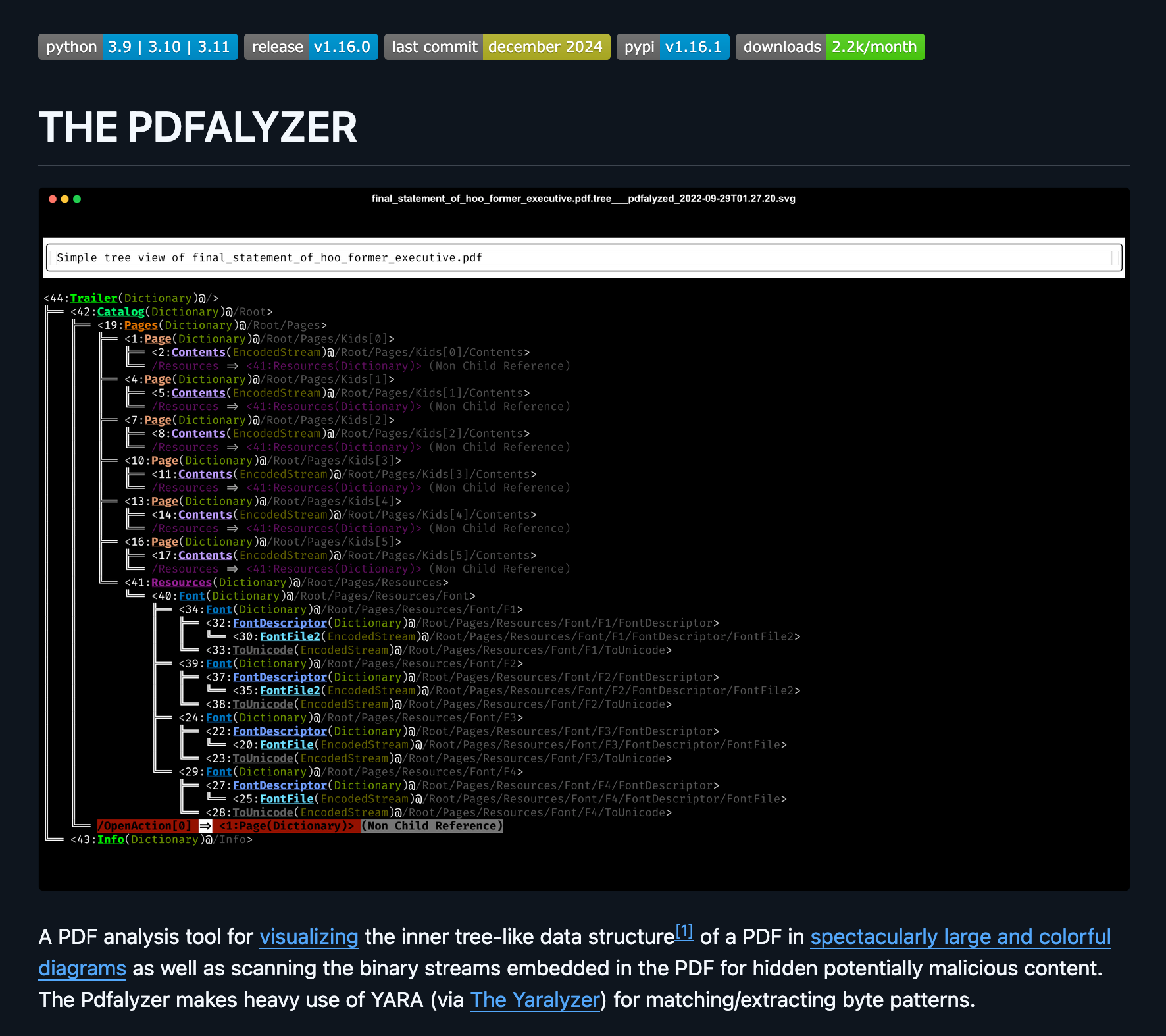
Released v1.17.0 of The Pdfalyzer, the surprisingly popular tool for analyzing (possibly malicious) PDFs I created after my own unpleasant experience. Now ships with two command line tools for extracting stuff from PDF files:
1. extract_text_from_pdfs() - brute force extract all text from a PDF, including doing an #OCR extraction of any embedded images
2. extract_pdf_pages() - rip a page range from a #PDF and write them to a new one
* Github: https://github.com/michelcrypt4d4mus/pdfalyzer
* Pypi: https://pypi.org/project/pdfalyzer/
* Homebrew: https://formulae.brew.sh/formula/pdfalyzer
* Fun thread someone made last week using Pdfalyzer to explain some of how byzantine the PDF format is: https://x.com/VikParuchuri/status/1965773078585344215
#pypi #python #pdf #pdfs #malware #Threatassessment #maldoc #malwareanalysis #homebrew #infosec #cybersecurity #yararule #PdfFies
Show Original Post
peterdrake (@peterdrake@mstdn.social)
#python folks:
I'm distributing some scripts in a GitHub repository. I would like anyone who clones this repo to get the correct versions of packages on which my scripts depend.
What's the proper way to do this?
I'm seeing stuff about setup.py, but (a) that seems more directed at packages to be installed, and (b) while PyCharm can generate it, it doesn't include required packages.
Am I barking up the correct tree?
Show Original Post
d_prieto (@d_prieto@peoplemaking.games)
Pues preparando unas clases descubrí el "zen of python" que es lo que ocurre si le dices al intérprete "import this" y me pareció gracioso

Show Original Post
chrysn (@chrysn@chaos.social)
Thanks to @pyodide and @ProjectJupyter, using #CoAP is becoming more accessible: The latest version of the #aiocoap documentation has examples that can be run directly from the documentation, and access CoAP peers through a WebSocket-to-UDP cross proxy:
<https://aiocoap.codeberg.page/aiocoap/doc/pyodide.html#contrib-pyodide>
Show Original Post