derickr (@derickr@phpc.social)
@ramsey And here is the article on how to show timezones to users: https://derickrethans.nl/selecting-time-zones.html
Show Original Post
blog (@blog@social.derickrethans.nl)
Selecting Time Zones
Original Post
On the phpc.chat Discord, a user of a website was complaining that a site required them to select their home time zone from the 500 item long list of IANA Time Zone Identifiers. You might have encountered these in the form of Europe/London, America/Los_Angeles, or Asia/Gaza.
But the fact is, these identifiers are not intended to be shown to users directly. They indicate the largest populated city in the are that the time zone covers, when the time zone identifier was established. It is therefore not even the 'capital' city, and henceforth we have Asia/Shanghai, and not Asia/Beijing.
This is a useful feature, because sometimes it is necessary to split a zone in two, and then there is no need to argue what the name of each of the two split zones should be.
Although these identifiers are , they shouldn't be used in front-ends to let users of websites choose what their zone is. And certainly not in a single big list.
Instead, the Time Zone Database carries extra information for zones to indicate to which country/countries they belong, their centroid coordinates, and often a comment. These comments are user-presentable and used to distinguish between the various options in a specific country.
PHP exposes this functionality too.
For example, you can list all the identifiers belonging to a country with the following code:
<?php
$tzids = DateTimeZone::listIdentifiers(DateTimeZone::PER_COUNTRY, 'PS');
var_dump($tzids);
?>XXX
Which outputs:
array(2) {
  [0] => string(9) "Asia/Gaza"
  [1] => string(11) "Asia/Hebron"
}XXX
So now we know that there are two time zones associated with Palestine.
Where there is more than one time zone per country, the TZDB also includes a comment with each time zone. You can query these with PHP as well:
<?php
$tz = new DateTimeZone('Asia/Hebron');
echo $tz->getLocation()['comments'], "\n";
?>XXX
Which outputs:
West BankXXX
Each getLocation()'s return value also includes the country_code element:
<?php
$tz = new DateTimeZone('Europe/Kyiv');
echo $tz->getLocation()['country_code'], "\n";
?>XXX
Which outputs: UA.
These features together make it possible to create a user-friendly time zone selector. You can either first ask for the country, and then present all time zones for this country, like I have shown above. For this you would use DateTimeZone::listIdentifiers(DateTimeZone::PER_COUNTRY, $country_code) and DateTimeZone->getLocation()['comments'], or you can build up an array of all zones organised by country code (and cache this information):
<?php
$tzs = [];

foreach (DateTimeZone::listIdentifiers() as $tzid) {
        $tz = new DateTimeZone($tzid);
        $location = $tz->getLocation();

        $tzs[$location['country_code']][$tzid] =
                $location['comments'] ?: 'Whole Region';
}

ksort($tzs);
var_export($tzs);
?>XXX
This outputs a very big list, an extract looks like:
…
'GB' =>
array (
  'Europe/London' => 'Whole Region',
),
…
'PS' =>
array (
  'Asia/Gaza' => 'Gaza Strip',
  'Asia/Hebron' => 'West Bank',
),
…XXX
Of course, you shouldn't show country codes to users, and translate Whole Region into your user's preferred language.
The Unicode Consortium's Unicode Common Data Repository project can help you with expressing the country code as a name. I have used icanboogie/cldr for this before.
With:
composer require icanboogie/common:^6.0-dev icanboogie/accessor:^6.0-dev icanboogie/cldr:^6.0-dev``XXX
The full example would look like:
<?php
require 'vendor/autoload.php';

use ICanBoogie\CLDR\Repository;
use ICanBoogie\CLDR\Cache\CacheCollection;
use ICanBoogie\CLDR\Cache\RuntimeCache;
use ICanBoogie\CLDR\Provider\CachedProvider;
use ICanBoogie\CLDR\Provider\WebProvider;

$locale = 'en';

$provider = new CachedProvider(
        new WebProvider,
        new CacheCollection([
                new RunTimeCache,
        ])
);
$repository = new Repository($provider);

$tzs = [];

foreach (DateTimeZone::listIdentifiers() as $tzid) {
        $tz = new DateTimeZone($tzid);
        $location = $tz->getLocation();

        try {
                $territory = $repository->territory_for($location['country_code']);
                $countryName = $territory->name_as($locale);
        } catch (Exception $e) {
                $countryName = 'Unknown';
        }

        $tzs[$countryName][$tzid] =
                $location['comments'] ?: 'Whole Region';
}

ksort($tzs);
var_export($tzs);
?>XXX
With as excerpted output (using the en locale):
…
'Palestinian Territories' => array (
   'Asia/Gaza' => 'Gaza Strip',
   'Asia/Hebron' => 'West Bank',
 ),
…
'United Kingdom' => array (
  'Europe/London' => 'Whole Region',
),
…XXX
Or with the cy (Welsh) locale:
…
'Tiriogaethau Palesteinaidd' =>
array (
  'Asia/Gaza' => 'Gaza Strip',
  'Asia/Hebron' => 'West Bank',
),
…
'Y Deyrnas Unedig' =>
array (
  'Europe/London' => 'Whole Region',
),
…XXX
Now you just need to find out how to translate Whole Region into each language. Pob Lwc!
Show Original Post
jaapio (@jaapio@phpc.social)
I'm doing research on use-cases of #Redis® or #valkey. And how developers are using those in their applications. Boost for more reach would be very nice.
Show Original Post
darkghosthunter (@darkghosthunter@mastodon.social)
And then, I stopped using #Zed for PHP.
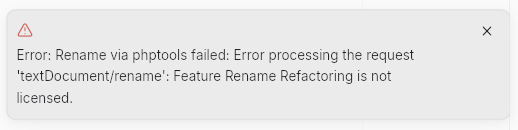
I understand they value their plugin highly, but at that price you can't compete with #PHPStorm. Plus, I can keep it.
#Programming #PHP #ZedEditor #SoftwareDevelopment #JetBrains #WebDevelopment #WebDev #Coding #Code #VSCode #Cursor #CursorEditor
Show Original Post
r (@r@fed.brid.gy)
PHP: a fractal of bad design (2012)
https://fed.brid.gy/r/https://eev.ee/blog/2012/04/09/php-a-fractal-of-bad-design/
Show Original Post
r (@r@web.brid.gy)
PHP: a fractal of bad design (2012)
https://web.brid.gy/r/https://eev.ee/blog/2012/04/09/php-a-fractal-of-bad-design/
Show Original Post
ramsey (@ramsey@phpc.social)
In phpc.chat Discord today, @derickr shared this method for listing human-friendly time zone regions for any country. Want to prompt your users to choose their time zone? Use this approach.
Show Original Post
jclermont (@jclermont@phpc.social)
Here's an interesting thought experiment that might influence how many packages you pull into your project. What if every Composer package you installed had a license fee? #php #laravel https://masteringlaravel.io/daily/2023-09-08-what-if-every-composer-package-had-a-fee
Show Original Post
michaela (@michaela@mstdn.molthagen.de)
Wer Joomla nutzt, nginx verwendet und das Administrator-Verzeichnis mit auth_basic absichern möchte, wird erleben, dass administrator/index.php dennoch ohne Passwortabfrage aufgerufen werden kann.
Ich konnte das mit folgenden Zeilen in der nginx-Konfiguration für Joomla verhindern (zusätzlich zur normalen PHP-Sektion):
location /administrator/ {
  auth_basic "Password Required";
  auth_basic_user_file /var/www/.htpasswd;
  location ~ \.php$ {
    fastcgi_pass unix:/run/php/php8.4-fpm.sock;
    fastcgi_index index.php;
    include fastcgi_params;
    fastcgi_param SCRIPT_FILENAME $document_root$fastcgi_script_name;
    include /etc/nginx/fastcgi.conf;
  }
}
Habe dabei gelernt, dass Locations-Anweisungen verschachtelt werden können.
Und: nginx arbeitet zuerst Locations mit regulären Ausdrücken ab. So wird location ~ \.php$ vor location /administrator/ verarbeitet, die deswegen nicht mehr greift.
Durch die zweite Location innerhalb von location /administrator greift diese nun auch und stellt PHP-Dateien unter den Schutz von auth_basic.
So jedenfalls meine laienhafte Erklärung...
Show Original Post
inautilo (@inautilo@mastodon.social)
#Development #Findings
Top Programming Languages 2025 · IEEE Spectrum’s annual interactive rankings https://ilo.im/16747b
_____
#Programming #JavaScript #Python #PHP #Rust #SQL #AI #WebDev #Frontend #Backend
Show Original Post
techbot (@techbot@social.raytec.co)
Hidden WordPress Backdoors Creating Admin Accounts
Two malicious files were discovered on a compromised WordPress website, designed to manipulate administrator accounts and maintain unauthorized access. The first file, disguised as a plugin called 'DebugMaster Pro', created a secret admin user and communicated with a command and control server. The second file, 'wp-user.php', ensured a specific admin user with a known password was always present. Both files worked together to create a robust system for persistent access, allowing attackers to control the site, inject spam, redirect visitors, or steal information. The malware also injected malicious scripts for visitors and tracked admin IPs. Cleaning requires removing the files, auditing accounts, resetting credentials, and hardening the site against reinfection.
Pulse ID: 68d3c86ea0c88315316a69be
Pulse Link: https://otx.alienvault.com/pulse/68d3c86ea0c88315316a69be
Pulse Author: AlienVault
Created: 2025-09-24 10:31:10
Be advised, this data is unverified and should be considered preliminary. Always do further verification.
#BackDoor #CyberSecurity #ESET #InfoSec #Malware #OTX #OpenThreatExchange #PHP #Password #RAT #RDP #Spam #Word #Wordpress #bot #AlienVault
Show Original Post
norbert (@norbert@phpc.social)
Some nice performance optimizations are coming to Flow #PHP Parquet library (mostly related to PHP Thrift implementation) 💪

Show Original Post