2026 (@2026@jws.news)
Trying to figure out the CodePen 2.0 editor
Recently, CodePen introduced CodePen 2.0, and since then, I have been trying to figure out how to modify my workflow for this blog to use it. I have been using CodePen to host my code demos for over six years now, and it feels weird to change, but it seems like a positive development. Lately, I have been writing a lot of posts about how to use Vue.js with Web Awesome. Let’s start with something that we can use to demonstrate basic functionality with Vue.js, Web Awesome, and Font Awesome.
So, what’s going on here? In previous demos (like the one for More Web Awesome Dropdowns), there were three files for each pen (the markup, CSS, and JavaScript). For 2.0 pens, you can have many more (and it uses Vite). In the demo above, App.vue handles the application layout, Header.vue handles the header, and CounterButton.vue handles the button’s behavior. I have done A LOT of experimentation since the 2.0 editor dropped, and I can’t get a few things (like Vue Router) to work, but I am hoping that will come with time. Since I can add more files, I added the social meta tags and a manifest.json. It means that the result should be more shareable on its own. I also added a light-mode/dark-mode toggle, a link to view the files, and a link to the blog post.
I think that, moving forward, I will keep using the same header. I hope that you appreciate the result.
Example: https://strange-scene-malamute.codepen.app
#CodePen #FontAwesome #VueJs #WebAwesome
Show Original Post
habr (@habr@zhub.link)
Как не надо писать Store в Pinia (Vue). Разбираем на выдуманном примере
Сегодня посмотрим на вымышленный пример, как не надо делать стор. Любые совпадения - случайность. Все истории выдуманы. Представьте: есть у нас герой Алекс. Перекидывают его на проект - «поправить пару простых багов, делов на пять минут». Открывает Алекс код, а там… У него сердце замирает. Подумаешь, с кем не бывает. Но внутри начинается дилема: просто пофиксить баги и забыть этот ужас как страшный сон, либо как настоящий богатырь проектов взять и отрефакторить весь этот бардак. Сделать по-человечески, заложить нормальную основу. Да, потом спросят за новые баги - ну и что. Зато внутри тепло разольётся, что не забил на плохой код и навёл порядок.
https://habr.com/ru/articles/1028052/
Show Original Post
thewhalecc (@thewhalecc@framapiaf.org)
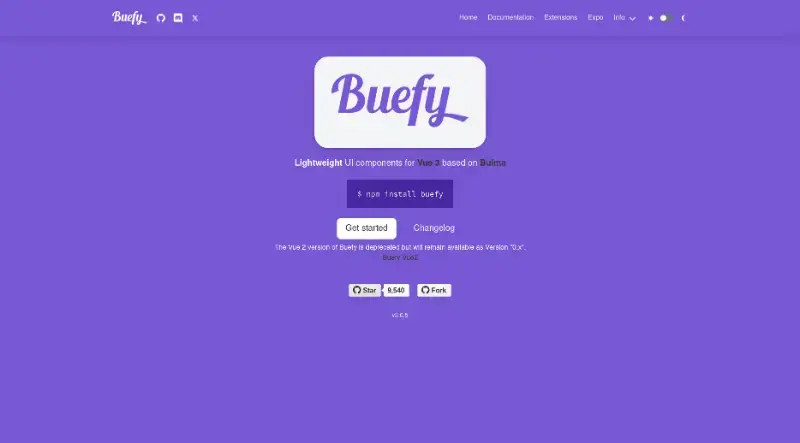
𝗩𝘂𝗲.𝗷𝘀 + 𝗕𝘂𝗹𝗺𝗮 = 𝗕𝘂𝗲𝗳𝘆:
https://thewhale.cc/posts/vuejs-bulma-buefy
Buefy is a lightweight and reponsive UI components for Vue.js based on the Bulma CSS framework.
Show Original Post
WanadevDigital (@WanadevDigital@piaille.fr)
Le 22 mai, l'équipe se déplace. 🤗
📍 Madrid : Louis à la #MadVue (#VueJS)
📍 Lyon : Mohamed & Xavier à l'#AFUPDay (#PHP)
On y va pour apprendre et partager. On se voit là-bas ? 🤗

Show Original Post
2026 (@2026@jws.news)
More Web Awesome Dropdowns
Back in February, we looked at how to use Vue.js and Web Awesome to create dropdowns. I wanted to take a moment to look at other ways we can use Vue and Web Awesome to do cool things with Dropdowns. In today’s post, we will use the data files at data.jws.app to populate dropdowns in a webform. We previously used that data while looking at how to implement an autocomplete using web components. That work used Lit to create more maintainable Web Components that could be used and reused in development projects. Instead of using Lit this time, we are going to be using Web Awesome, but since Web Awesome uses Lit, we are still kind of using Lit. For today’s demos, we will look at how to create a contact form.
Our data website has a JSON file listing counties in Wisconsin. If we get that data asynchronously in onMounted(), we can populate a Ref with the listing of counties. At that point, you just need a v-for loop.
This has minimal utility because most contact forms will be used outside the great state of Wisconsin. I created a 426KB data file that has the names of the counties in every state. If we use a computed value for both the stateNames and countyNames arrays, we can make the list of county names depend on the selected state.
CodePen Embed FallbackIf the goal is to get the user’s contact information, you are more likely to want their state, city, and zip code rather than their state and county. The problem is that the data file balloons a lot at this point. A single data file containing every state, city, and zip code is 10.5 MB, which is a lot for a slower data connection to download. For the next example, we will try to use the same pattern as the last one.
CodePen Embed FallbackAs I said above, the problem is that our data file is ridiculously large. A 10.5 MB dependency on a webpage is unacceptable. My rule of thumb has always been that if a webpage can’t load over a bad cellular connection, it doesn’t function. If we want to have State, City, and Zip Code dropdowns, we can’t reduce the amount of data we are working with, but we can reduce the amount of data that is loaded into memory at the same time.
To make the final demo more performant, I split the data file into one for states and another for cities and ZIP codes in each state (e.g., AL, AK, AZ, AR). Now, the data file for the states is only 5.96 KB, and the data file for cities and zip codes in Wisconsin is 215 KB. 220.96 KB is much easier for mobile data users. Let’s see what that would look like.
CodePen Embed FallbackWe still watch the state, city, and zip values, but now we use await fetch() to retrieve the city and zip code data when the selected state changes.
What’s next? The inevitable next step would be to integrate street addresses, but if the dataset for US states, cities, and zip codes is 10.5 MB, the dataset for every street address in America would be significantly larger. The better option would be to use an API connected to a GIS server.
First Example: https://codepen.io/steinbring/pen/NPrjvNx/6f7d77a802b2fb359f3432ccf3844fe5
Second Example: https://codepen.io/steinbring/pen/wBWdVYW/fc70e2d022318800492654b73559cbe7
Third Example: https://codepen.io/steinbring/pen/xbOWqdN/ebbd160959669145be5a28f53f3f4e9e
Fourth Example: https://codepen.io/steinbring/pen/jErzBvK/cb69e49c7402268053845a0abd0f1f84
#VueJs #WebAwesome
Show Original Post
habr (@habr@zhub.link)
FiT календарь тренировок — финал трилогии пет-проекта
Год назад я опубликовал первую статью про разработку приложения календаря тренировок. Спустя 5 месяцев опубликовал рассказ о 10 обновлениях . Сейчас время финала истории - ещё 7 обновлений за 7 месяцев. Сам регулярно пользуюсь приложением - оно добавляет мотивации заниматься спортом дальше, сохраняет график тренировок, следит за объемом выполненных упражнений. На текущий момент в приложении больше 150 зарегистрированных пользователей. Времени на пет-проект уделял крайне мало, но основная функциональность была уже готова ранее. Сейчас на нём можно пробовать что-то новое - получается хороший полигон для испытаний. Исходный код Приложение в RuStore Веб-версия Frontend: Typescript, Vitest, Vite, Vue, Tanstack Query, Vue I18n, Tauri Backend: Typescript, Vitest, Esbuild, Fastify, Mongoose, MongoDB, Swagger
https://habr.com/ru/articles/1021790/
#vue #vuejs #vuejs #петпроект #петпроекты #tauri #мобильные_приложения #javascript #typescript #вебприложения
Show Original Post
habr (@habr@zhub.link)
Как я выбирал стек для SaaS-мониторинга сайтов
Как в одиночку собрать полноценный сервис мониторинга с проверками из 10 точек мира, алертами в Telegram/Slack и собственным агентом? Делюсь личным опытом выбора стека: почему FastAPI выиграл у Django, как TimescaleDB справляется с миллионами строк логов и зачем писать агент на Go, если основной код на Python. Только практика, архитектурные решения и честный расчет стоимости инфраструктуры в €11/мес. Изучить стек
https://habr.com/ru/articles/1021000/
#FastAPI #Vuejs #TimescaleDB #SaaS #мониторинг_сайтов #Celery #Go #архитектура #стартап #разработка
Show Original Post
habr (@habr@zhub.link)
Как мы оптимизировали компоненты во фронтенде: работа с версиями и оптимизация процессов
Привет, Хабр! Меня зовут Василий Беляев. Я руководитель группы разработки по направлению фронтенда в ИТ-компании «Криптонит». В этой статье я расскажу про организацию работы с версиями и компонентами, оптимизацию рабочего процесса внутри команды, а также опишу несколько лайфхаков, которые мы применили
https://habr.com/ru/companies/kryptonite/articles/1020720/
#оптимизация #frontend #vuejs #библиотеки #packagejson #workflow #конфигурация #сборка_проекта #синхронизация_версий
Show Original Post
michabbb (@michabbb@social.vivaldi.net)
#Directus layers a blazingly fast #NodeJS API on top of any existing SQL database. No schema changes needed, works with what you already have.
🗄️ Database Freedom:
#PostgreSQL, #MySQL, #SQLite, #MariaDB, MS-SQL, #CockroachDB & #OracleDB — you choose, Directus connects.
🎨 No-Code Admin Dashboard
Built with #VueJS, intuitive and secure. Non-technical users can manage content without any training required.
🔌 Fully Extensible & White-Label Ready
Show Original Post
wordmark (@wordmark@mas.to)
possibly affected: #React
#Vuejs applications (including Vue CLI projects)
#äNuxtjs projects (server-rendered Vue apps and examples)
#Nextjs example apps and tutorials (React SSR/static apps often use Axios)
React Native apps (mobile apps fetching APIs)
#Electron desktop apps (desktop JS apps making HTTP calls)
possibly #SignalDesktop
Show Original Post
2026 (@2026@jws.news)
How to use wa-radio-group with Vue
Previously, we went over how to use wa-card, wa-grid, wa-dropdown, and wa-relative-time. The next post in the Web Awesome/Vue series will be about the wa-radio-group component. This could be useful for wiring up a web form or for writing the interface for a results listing (like the “Buy Now,” “Make an Offer,” or “Auction” interface on eBay). Let’s see what is possible with Web Awesome.
For our first, let’s look at the simplest possible example. There is a horizontal radio button group, a vertical radio button group, colorOptions and foodOptions arrays to control what the radio button groups consist of, and ref objects for selectedColor and selectedFood.
CodePen Embed FallbackIf you add an appearance="button" attribute to the wa-radio blocks, it changes it from looking like a group of buttons instead of radio controls.
You will notice, though, that Vue variables for defining the options and what is selected are fine, but the value for what is selected doesn’t change when you change what is selected. So, how can you do that?
CodePen Embed FallbackThe only change in this final example is the addition of an @change="selectedColor = $event.target.value" attribute. Whenever the selection changes, it fires that and changes the value.
Please feel free to drop a comment if you have a question about any of this.
First example: https://codepen.io/steinbring/pen/WbxweXR/e045e86b81364eca311b9c0982b711c5
Second example: https://codepen.io/steinbring/pen/YPWqKpM/f47bd1b7334c432dc9ad5de93a281adc
Third example: https://codepen.io/steinbring/pen/dPXMWog/9d4c39becfdd948bd43eacc80cca0428
#VueJs #WebAwesome
Show Original Post
themepure (@themepure@mastodon.social)
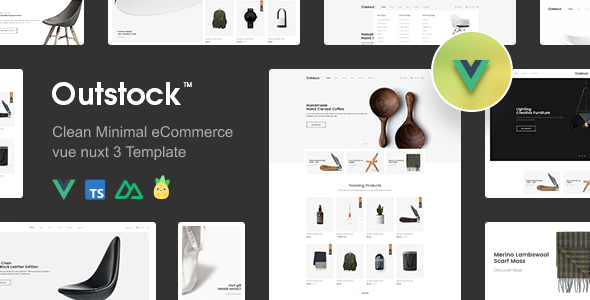
Outstock – Clean & Modern eCommerce Vue Nuxt 4 Template
Build a powerful online store with a minimal and high-performance design!
Tech Stack:
Vue 3 • Nuxt 4 • TypeScript • Pinia • Bootstrap 5 • Sass
Best for:
Fashion, apparel, cosmetics, watches, accessories & mega stores
Highlights:
✔ 7+ Home Pages
✔ 20+ Pages Included
✔ Fully Responsive Design
✔ SEO Optimized
✔ Fast & Lightweight
✔ Clean Minimal UI
Launch your next eCommerce project faster with Outstock!
#eCommerce #VueJS
Show Original Post